📌
##################################################
# Fashion-MNIST 데이터셋 다운로드
from tensorflow.keras.datasets.fashion_mnist import load_data
from tensorflow.keras.utils import to_categorical
from sklearn.model_selection import train_test_split
from tensorflow.keras.models import Sequential
from tensorflow.keras.layers import Dense, Flatten
import numpy as np

(x_train, y_train), (x_test, y_test) = load_data()
print(x_train.shape,x_test.shape) #(60000, 28, 28) (10000, 28, 28)
class_names=['T-shirt/top', 'Trouser', 'Pullover', 'Dress', 'Coat',
         'Sandal', 'Shirt', 'Sneaker', 'Bag', 'Ankle boot']

x_train = x_train/255 #minmax 정규화. (x-min)/(max-min)
x_test = x_test/255

# 정답. one-hot 인코딩 => 다중분류. 10가지
y_train = to_categorical(y_train)
y_test = to_categorical(y_test)

# 훈련데이터, 검증데이터 분리
x_train, x_val, y_train, y_val = \\
    train_test_split(x_train, y_train, test_size=0.3, random_state=777)

# 모델 생성.
# 완전 밀집층 - 가장 기본
model1 = Sequential()
model1.add(Flatten(input_shape = (28,28))) # 28*28 = 784 1차원 배열로 변경
model1.add(Dense(64, activation = 'relu'))
model1.add(Dense(32, activation = 'relu'))
model1.add(Dense(10, activation = 'softmax'))
model1.summary()
model1.compile(optimizer='adam', \\
               loss='categorical_crossentropy', metrics=['acc'])

# 학습하기.
history1 = model1.fit(x_train, y_train, epochs=30,
                      batch_size=128, validation_data=(x_val, y_val))
history1.history["loss"][29] # 0.20511168241500854
history1.history["acc"][29] # 0.9229047894477844
history1.history["val_loss"][29] # 0.335575670003891
history1.history["val_acc"][29] # 0.8891111016273499

# 테스트데이터의 손실 함수값, 정확도 출력하기
model1.evaluate(x_test, y_test)

# 예측하기
results = model1.predict(x_test)
np.argmax(results[:10], axis=-1)
np.argmax(results[:10], axis=-1)

# 평가하기
from sklearn.metrics import classification_report, confusion_matrix
# 혼동행렬 출력하기
cm = confusion_matrix(np.argmax(y_test, axis=-1),\\
                      np.argmax(results, axis=-1))
cm

# 혼동행렬을 heatmap으로 출력하기
import matplotlib.pyplot as plt
import seaborn as sns
plt.figure(figsize = (7,7))
sns.heatmap(cm, annot = True, fmt = 'd',cmap = 'Blues')
plt.xlabel('predicted label', fontsize = 15)
plt.ylabel('true label', fontsize = 15)
# rotation=45 : 45도 각도로 틀어서 출력
plt.xticks(range(10),class_names,rotation=45) # x축의 값을 class_names로 변경
plt.yticks(range(10),class_names,rotation=0) # y축의 값을 class_names로 변경
plt.show()

# history1 데이터로 loss, acc - 훈련데이터, 검증데이터부분을 선그래프로 출력하기
import matplotlib.pyplot as plt
his_dict = history1.history
loss = his_dict['loss']  # 훈련데이터 학습시 손실함수값
val_loss = his_dict['val_loss'] # 검증데이터 학습시 손실함수값
epochs = range(1, len(loss) + 1) # 1 ~ 30까지의 숫자
fig = plt.figure(figsize = (10, 5))
ax1 = fig.add_subplot(1, 2, 1) # 1행2열의 1번째 그래프영역
ax1.plot(epochs, loss, color = 'blue', label = 'train_loss')
ax1.plot(epochs, val_loss, color = 'orange', label = 'val_loss')
ax1.set_title('train and val loss')
ax1.set_xlabel('epochs')
ax1.set_ylabel('loss')
ax1.legend()

# 정확도 그래프
acc = his_dict['acc'] # 훈련데이터 정확도값
val_acc = his_dict['val_acc'] # 검증데이터 정확도값
ax2 = fig.add_subplot(1, 2, 2) # 1행2열의 2번째 그래프 영역
ax2.plot(epochs, acc, color = 'blue', label = 'train_acc')
ax2.plot(epochs, val_acc, color = 'orange', label = 'val_acc')
ax2.set_title('train and val acc')
ax2.set_xlabel('epochs')
ax2.set_ylabel('acc')
ax2.legend()
plt.show()
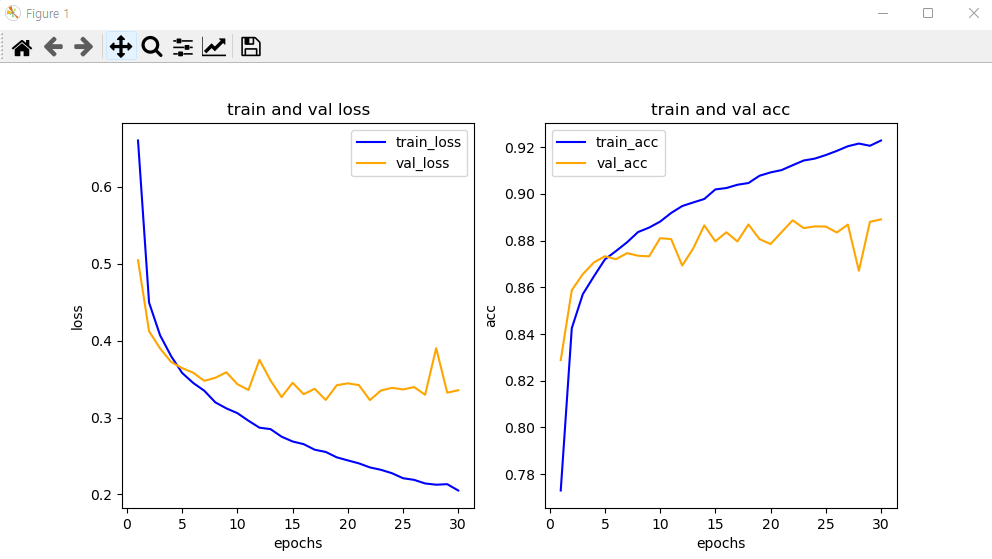
# model2 구성하여 학습하기
# 256, 128개의 출력을 가지는 은닉층을 추가.
model2 = Sequential()
model2.add(Flatten(input_shape = (28,28))) # 28*28 = 784 1차원 배열로 변경
model2.add(Dense(256, activation = 'relu')) # 256 출력 은닉층 추가
model2.add(Dense(128, activation = 'relu')) # 128 출력 은닉층 추가
model2.add(Dense(64, activation = 'relu'))
model2.add(Dense(32, activation = 'relu'))
model2.add(Dense(10, activation = 'softmax'))
model2.summary()
model2.compile(optimizer='adam', \\
               loss='categorical_crossentropy', metrics=['acc'])

history2 = model2.fit(x_train, y_train, epochs=30,
                      batch_size=128, validation_data=(x_val, y_val))
model1.evaluate(x_test, y_test) # [0.37518683075904846, 0.8776000142097473]
model2.evaluate(x_test, y_test) # [0.4585943818092346, 0.8810999989509583]
# 모델 저장하기
model1.save("fashion1.h5")
model2.save("fashion2.h5")

# 저장된 모델 로드
from keras.models import load_model
m1= load_model('fashion1.h5')
m2 = load_model('fashion2.h5')

m1.evaluate(x_test,y_test) # [0.37518683075904846, 0.8776000142097473]
m2.evaluate(x_test,y_test) # [0.4585943818092346, 0.8810999989509583]

results = m1.predict(x_test) # 예측하기
results2 = m2.predict(x_test) # 예측하기
np.argmax(results[:10], axis=-1)
np.argmax(results[:10], axis=-1)
'수업(국비지원) > Python' 카테고리의 다른 글
| [Python] 컬러 이미지 분석하기 (0) | 2023.04.27 |
|---|---|
| [Python] 이항 분류 (0) | 2023.04.27 |
| [Python] Fashion-MNIST 데이터를 이용하여 예측 평가하기 (0) | 2023.04.27 |
| [Python] MNIST 데이터를 이용하여 숫자를 학습하여 숫자 인식 (0) | 2023.04.27 |
| [Python] Tensortflow (0) | 2023.04.27 |


