❓
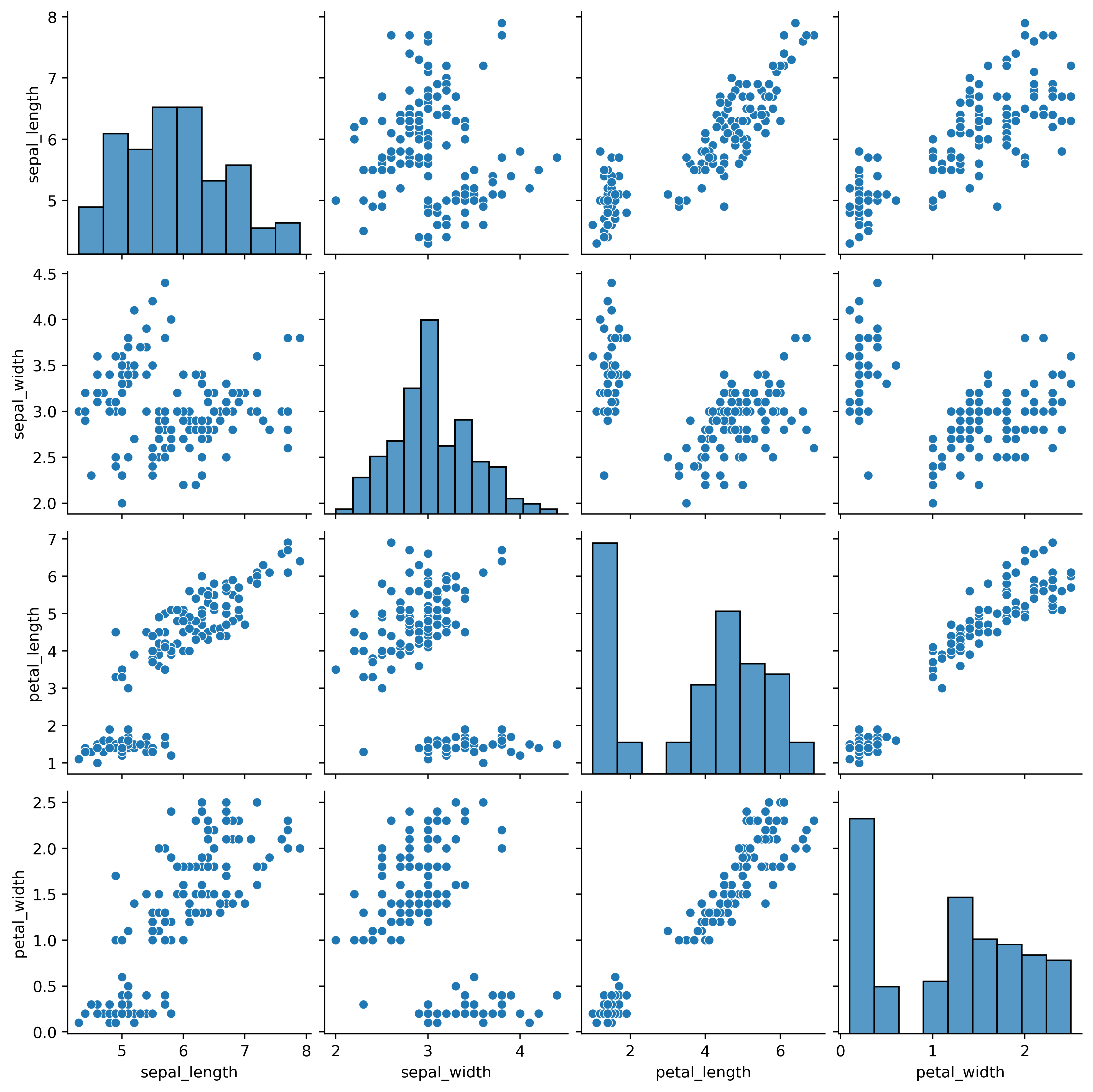
#1.seaborn 모듈의 iris 데이터 셋을 이용하여  품종별 산점도를 출력하기
# 20221206-1.png 파일 참조
#1
import seaborn as sns
import matplotlib.pyplot as plt
iris = sns.load_dataset("iris")
iris.info()
iris.species.unique()
iris.species.value_counts()
iris.corr()

sns.pairplot(iris)
plt.show()
# 그래프를 이미지 파일로 저장.
# savefig(저장파일명, 해상도, 이미지크기설정)
plt.savefig("20221206-1.png",dpi=400,bbox_inches="tight")
#2
import seaborn as sns
import matplotlib.pyplot as plt
# seaborn 모듈에 저장된 데이터셋 목록
print(sns.get_dataset_names())
#iris 데이터 로드
iris = sns.load_dataset("iris")
iris.info()
print(iris.shape) #결과 => (150, 5) : 150행 5열
iris.head()
## pairplot : 각각의 컬럼별 데이터 분포 그리기
#            각변수(컬럼)들의 산점도 출력
#            대각선위치의 그래프는 히스토그램으로 표시
iris_pair = iris[["sepal_length","sepal_width","petal_length","petal_width"]]
iris_pair #확인
sns.pairplot(iris_pair) #산점도와 히스토그램 데이터분포 출력
❓
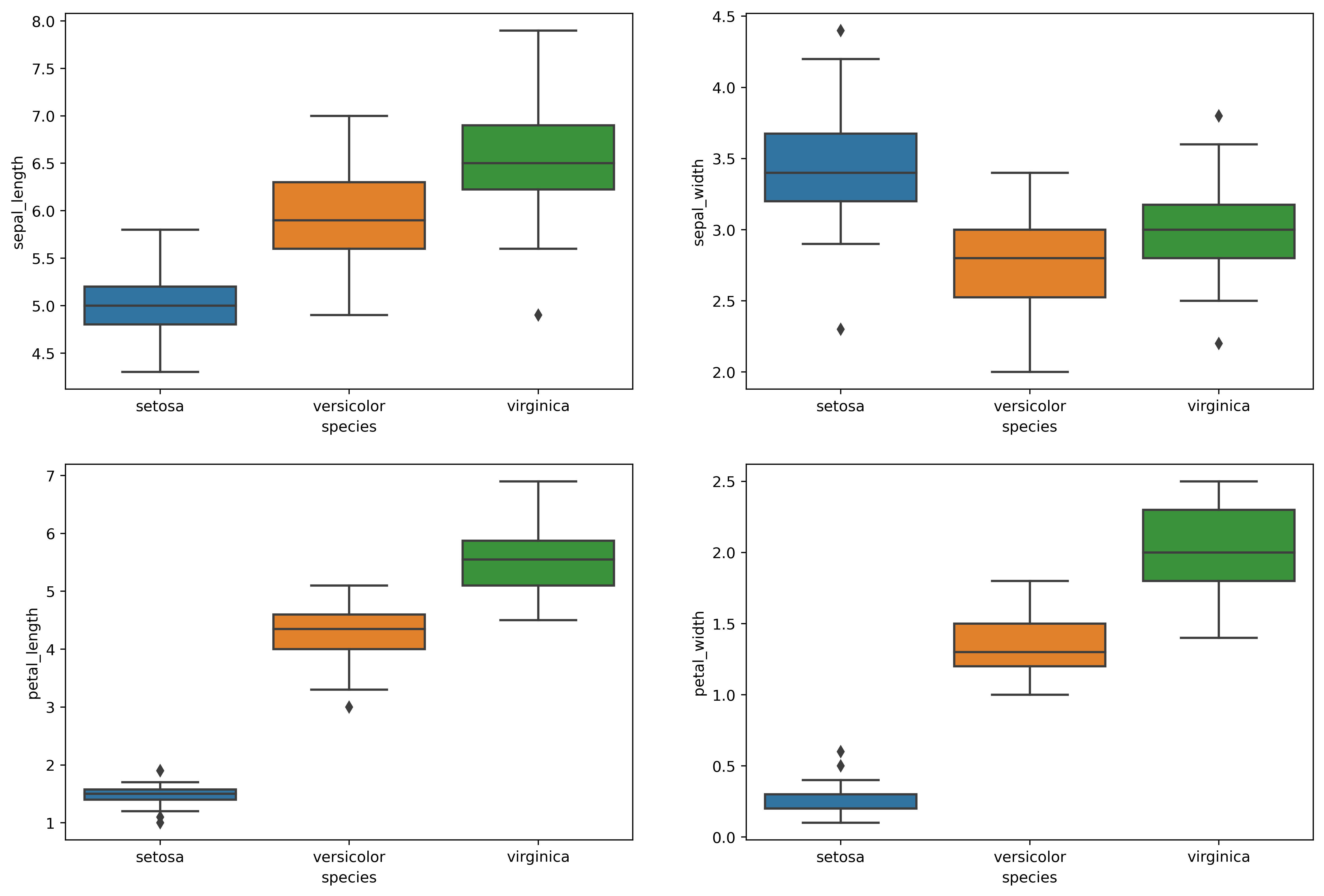
#2. iris 데이터 셋을 이용하여   각 컬럼의 값을  박스그래프로 작성하기
# 20221206-2.png 파일 참조
import seaborn as sns
import matplotlib.pyplot as plt
iris = sns.load_dataset("iris")
iris.head()
fig = plt.figure(figsize=(10,8))
ax1 = fig.add_subplot(2,2,1)
ax2 = fig.add_subplot(2,2,2)
ax3 = fig.add_subplot(2,2,3)
ax4 = fig.add_subplot(2,2,4)

sns.boxplot(x='species', y='sepal_length', data=iris, ax=ax1)
sns.boxplot(x='species', y='sepal_width', data=iris, ax=ax2)
sns.boxplot(x='species', y='petal_length', data=iris, ax=ax3)
sns.boxplot(x='species', y='petal_width', data=iris, ax=ax4)

plt.show()
plt.savefig("20221206-2.png",dpi=400,bbox_inches="tight")
❓
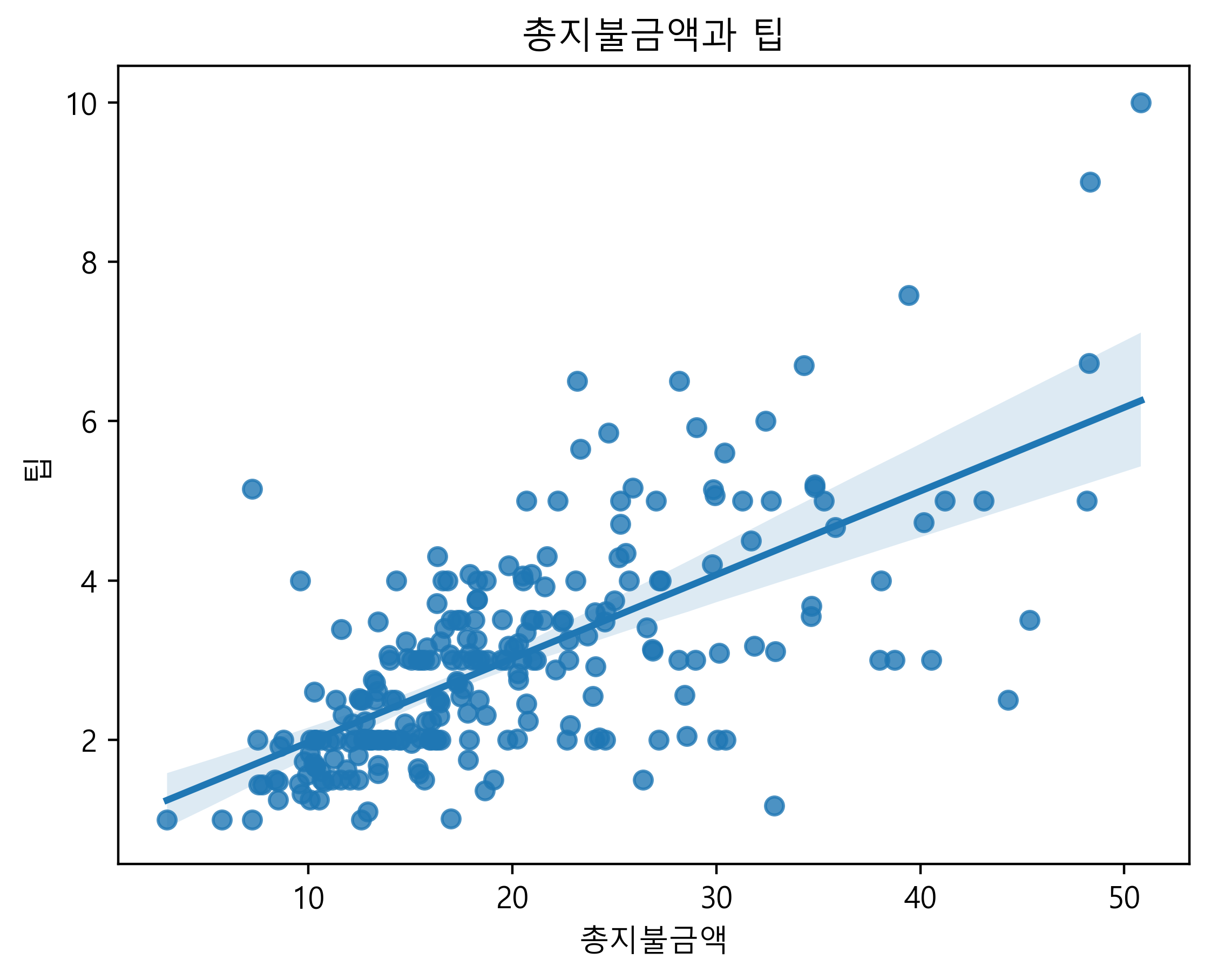
#3. tips 데이터 셋의 total_bill 별 tip  컬럼의 회귀선을 출력하기
# 20221206-3.png 파일 참조
import seaborn as sns
tips = sns.load_dataset("tips")
tips.info()
tips.head()
# 요일별 tip 갯수
tips.day.value_counts()

import matplotlib.pyplot as plt
plt.rc('font', family="Malgun Gothic")
ax = sns.regplot(x='total_bill', y='tip', data=tips)
ax.set_xlabel("총지불금액")
ax.set_ylabel("팁")
ax.set_title("총지불금액과 팁")

plt.show()
plt.savefig("20221206-3.png",dpi=400,bbox_inches="tight")
❓
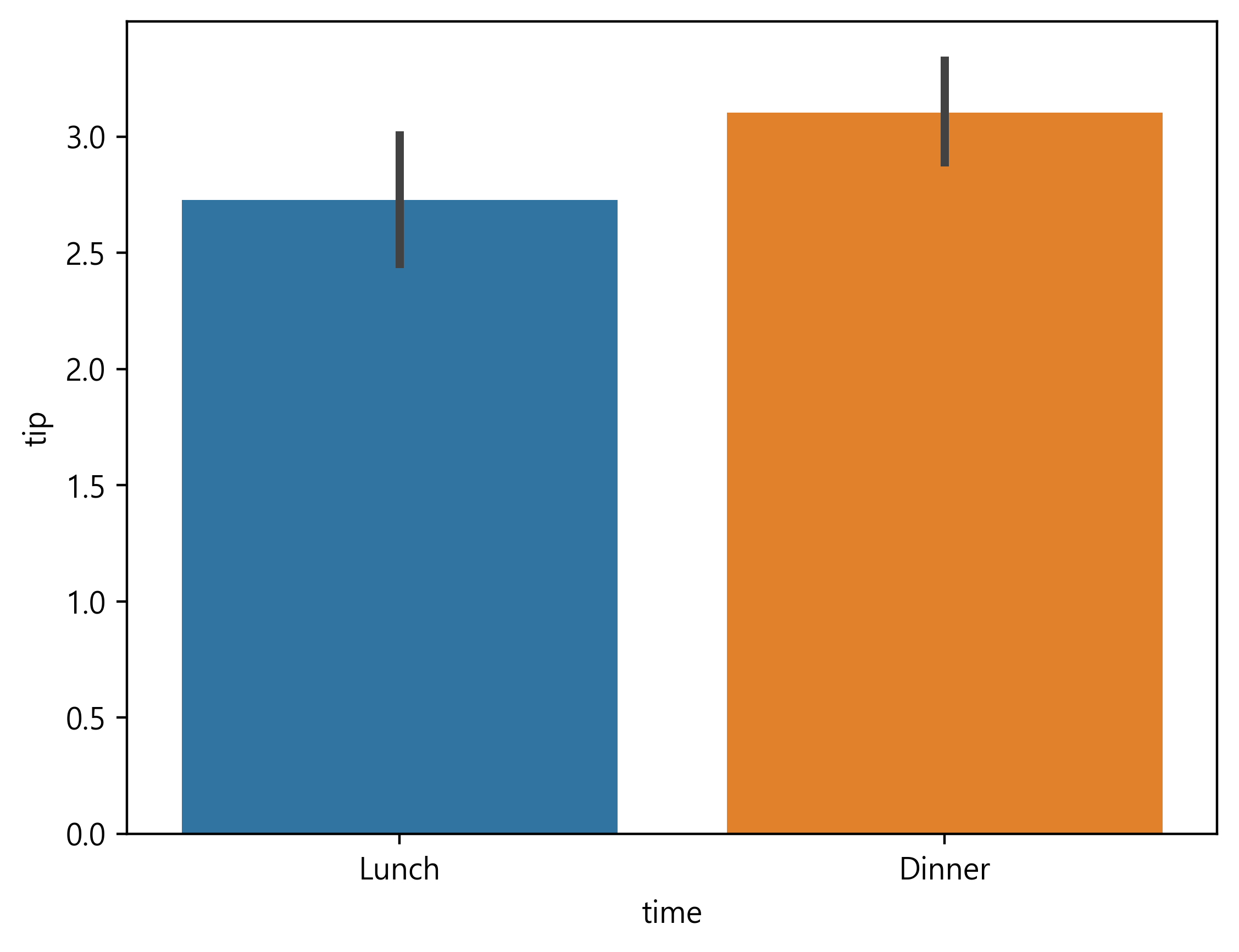
#4. tips 데이터에서 점심,저녁별 tip 평균 금액을 막대그래프로 작성하기
# 20221206-4.png 파일 참조
import seaborn as sns
import matplotlib.pyplot as plt
plt.rc('font', family="Malgun Gothic") # 폰트 변경 설정
tips = sns.load_dataset("tips")
tips['time']
tips[tips['time'] == 'Lunch'].mean()["tip"]
tips[tips['time'] == 'Dinner'].mean()["tip"]
sns.barplot(x='time', y='tip', data=tips) # barplot : time별 tip의 평균 그래프

plt.show()
plt.savefig("20221206-4.png",dpi=400,bbox_inches="tight")
❓
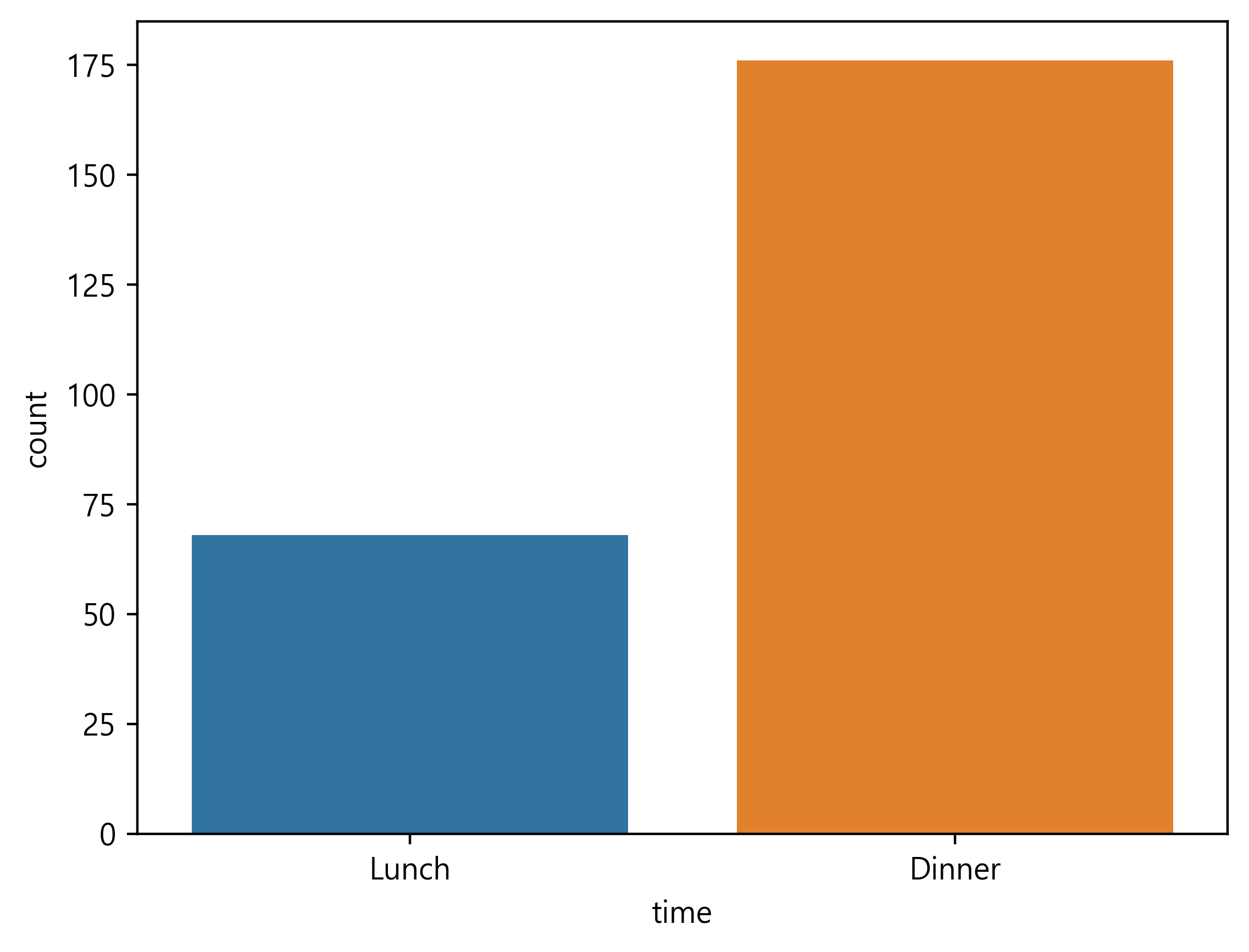
#5. tips 데이터에서 점심,저녁별 건수를 막대그래프로 작성하기
# 20221206-5.png 파일 참조
data_time = tips.time.value_counts()
data_time
#인덱스값으로 내림차순 정렬
data_time.sort_index(ascending=True,inplace=True)
plt.bar(data_time.index,data_time.values)
plt.savefig("20221206-5.png",dpi=400,bbox_inches="tight")
tips.time.value_counts() #점심,저녁별 건수 출력
❓
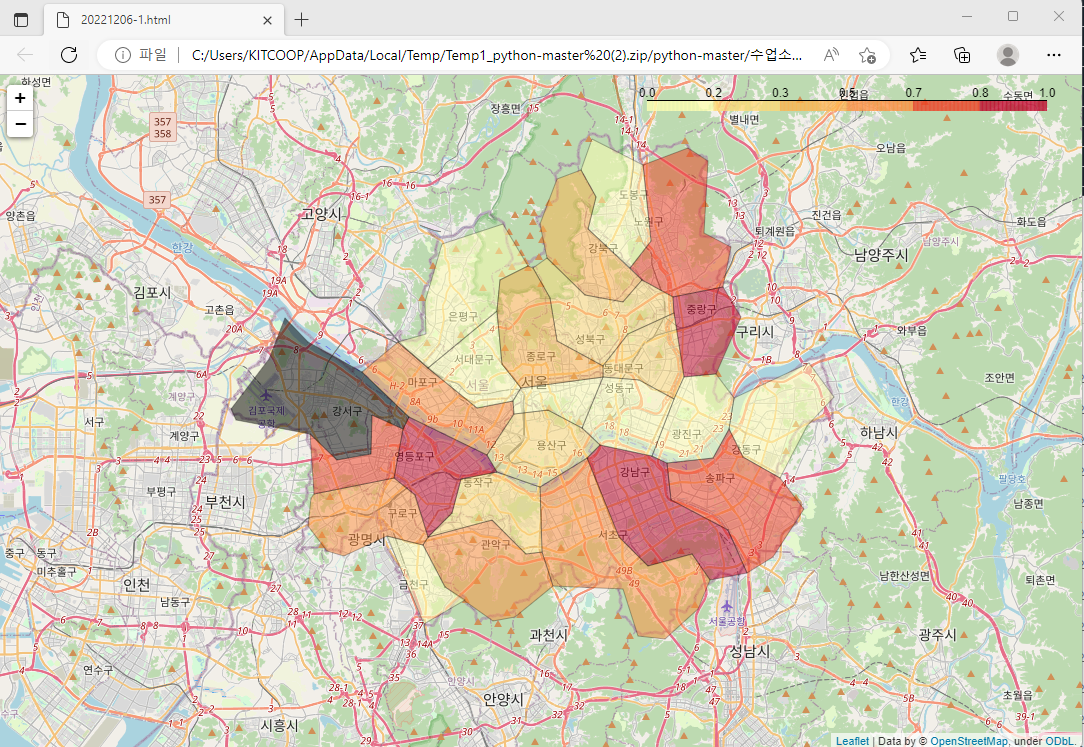
#6. 서울시 범죄율 데이터를 이용하여 살인 정보를 지도에 표시하기
#  지도 : 20221206-1.html 참조
#  지도표시 데이터 : skorea_municipalities_geo_simple.json
#  서울시 범죄율 데이터 : crime_in_Seoul_final.csv
#1
import seaborn as sns
import matplotlib.pyplot as plt
plt.rc('font', family="Malgun Gothic") # 폰트 변경 설정
tips = sns.load_dataset("tips")
tips['time']
tips[tips['time'] == 'Lunch'].mean()["tip"]
tips[tips['time'] == 'Dinner'].mean()["tip"]
sns.barplot(x='time', y='tip', data=tips) # barplot : time별 tip의 평균 그래프

plt.show()
plt.savefig("20221206-4.png",dpi=400,bbox_inches="tight")#1
import json
import folium
import pandas as pd
geo_path = "data/skorea_municipalities_geo_simple.json"
geo_str = json.load(open(geo_path, encoding='utf-8')) # 위치정보 파일
maps_korea = folium.Map(location=[37.5502,126.982],
                        zoom_start=11)
df = pd.read_csv("data/crime_in_Seoul_final.csv")
df=df.set_index("구별")
df.head()
maps_korea.choropleth(geo_data = geo_str, data=df["살인"],
                      columns = [df.index, df["살인"]],
                      fill_color = 'YlOrRd', fill_opacity=0.5,
                      line_opacity=0.3,
                      key_on="feature.properties.name")
maps_korea.save("20221206-1.html")
#2
import json
import folium
import pandas as pd
geo_path = "data/skorea_municipalities_geo_simple.json"
geo_str = json.load(open(geo_path, encoding='utf-8')) # 위치정보 파일
maps_korea = folium.Map(location=[37.5502,126.982],
                        zoom_start=11)
df = pd.read_csv("data/crime_in_Seoul_final.csv")
maps_korea.choropleth(geo_data = geo_str,
                      data=df, # 지도에 표시할 데이터 전체
                      columns = ["구별", "살인"],
                      fill_color = 'YlOrRd', fill_opacity=0.5,
                      line_opacity=0.3,
                      key_on="feature.id")
maps_korea.save("20221206-1.html")


