❓
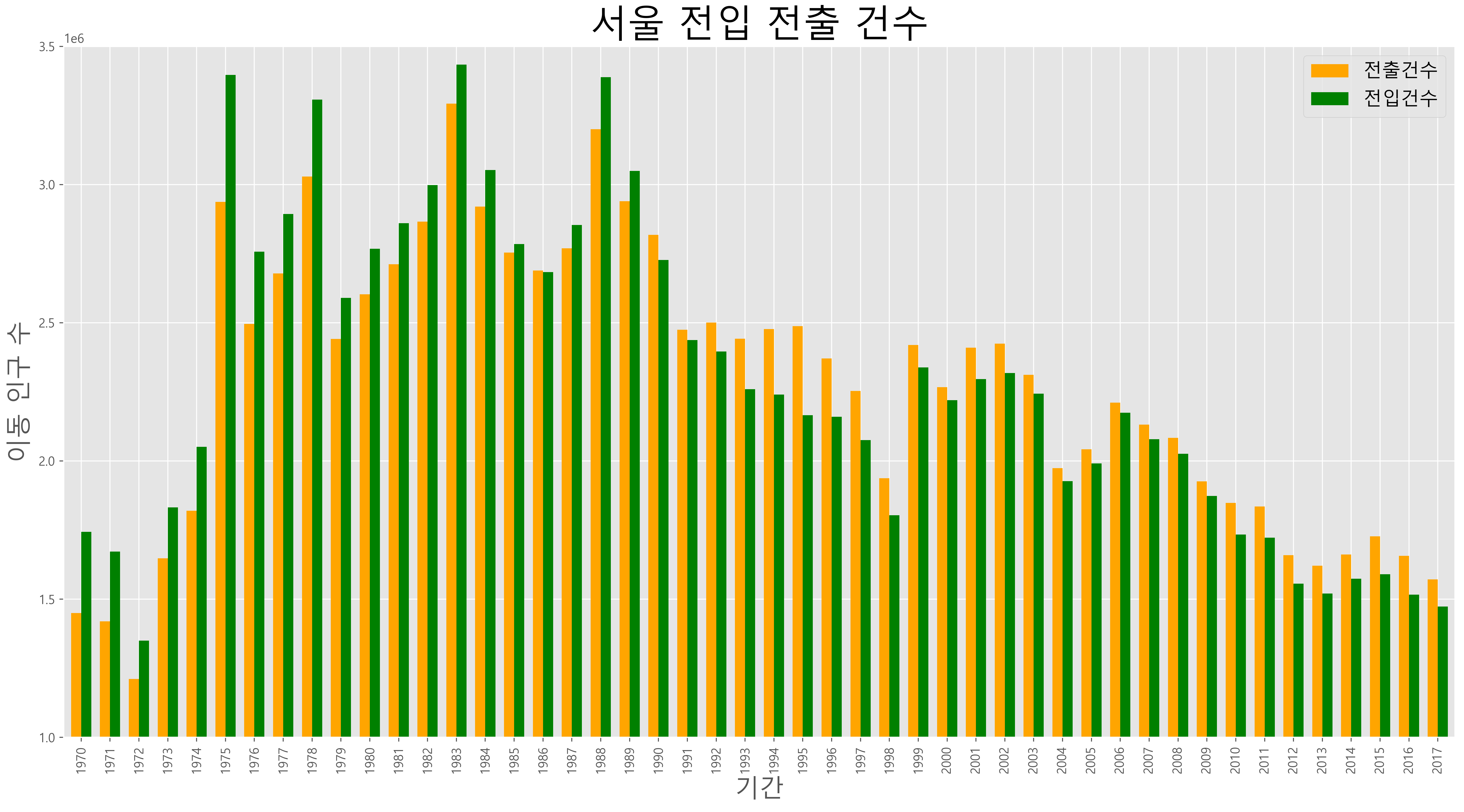
#1. 년도별 서울의 전입과 전출 정보를 막대그래프로 작성하여
#  20221205-1.png 파일로 그래프 저장하기
# 20221205-1.png 파일 참조

import pandas as pd
df = pd.read_excel("data/시도별 전출입 인구수.xlsx")
# fillna() : 결측값을 다른 데이터로 변경
df = df.fillna(method="ffill") # 결측값 처리

# 서울의 전출 정보
mask = ((df['전출지별'] == '서울특별시') & (df['전입지별'] == '전국'))
df_seoulout = df[mask] # 전출지가 서울 -> 전국
# df_seoulout : 서울에서 다른지역으로 나간 인구수데이터
# 전출지별 컬럼 삭제
df_seoulout = df_seoulout.drop(['전출지별'],axis=1)
df_seoulout
# 전입지별 컬럼을 index로 변환
df_seoulout.set_index('전입지별',inplace=True)
# 전국 인덱스를 전출건수 인덱스로 이름 변경
df_seoulout.rename({'전국':'전출건수'},axis=0,inplace=True)
df_seoulout

# 서울의 전입 정보
mask1 = ((df['전입지별'] == '서울특별시') & (df['전출지별'] == '전국'))
df_seoulin = df[mask1] # 서울 -> 전국으로 전출한 건수 정보
# 전입지별 컬럼 삭제
df_seoulin = df_seoulin.drop(['전입지별'],axis=1)
# 전출지별 컬럼을 인덱스로 변환
df_seoulin.set_index('전출지별',inplace=True)
df_seoulin
# 전국 인덱스를 전입건수 인덱스로 이름 변경
df_seoulin.rename({'전국':'전입건수'},axis=0,inplace=True)
df_seoulin

# 두개 내용 합치기
# pd.concat : 두개의 DataFrame 객체를 한개로 생성
df_seoul = pd.concat([df_seoulout,df_seoulin])
df_seoul

# 전치 행렬 : 행과 열을 변경
df_seoul = df_seoul.T

# 막대그래프로 작성
import matplotlib.pyplot as plt
plt.style.use("ggplot") # 그래프의 style 설정
plt.rc('font', family="Malgun Gothic") # 한글폰트 설정
df_seoul.plot(kind='bar', figsize=(10,5),
                           width=0.7, color=['orange','green'])
plt.title('서울 전입 전출 건수',size=30)
plt.ylabel('이동인구수',size=20) # 막대그래프 y축 값의 설명
plt.xlabel('기간',size=20) # x축 값의 설명
# loc = 'best' : 범례의 출력위치. 가장 좋은 위치 선택
plt.legend(loc = 'best') # 범례
plt.ylim(1000000,3500000) # 막대 그래프 y축의 값의 범위
plt.savefig("20221205-1.png",dpi=400,bbox_inches="tight")
plt.show() # 화면에 표시
❓
import pandas as pd
import matplotlib.pyplot as plt
plt.rc('font',family="Malgun Gothic")
# header=0 : 첫번째 데이터를 header로 사용하겠다.
df = pd.read_excel("data/시도별 전출입 인구수.xlsx", header=0)
df = df.fillna(method='ffill')
mask = (((df['전출지별'] == '서울특별시') & (df['전입지별'] == '전국')) |
        ((df['전입지별'] == '서울특별시') & (df['전출지별'] == '전국')))
df_seoul = df[mask]
df_seoul
#'전출지별','전입지별' 컬럼을 삭제
df_seoul = df_seoul.drop(['전출지별','전입지별'], axis=1)
df_seoul.index
# 새로 인덱스 생성
df_seoul.index = ["전입건수",'전출건수']
print(df_seoul)
# 전치행렬 : 행과 열을 바꿈
df_seoul = df_seoul.T
print(df_seoul)
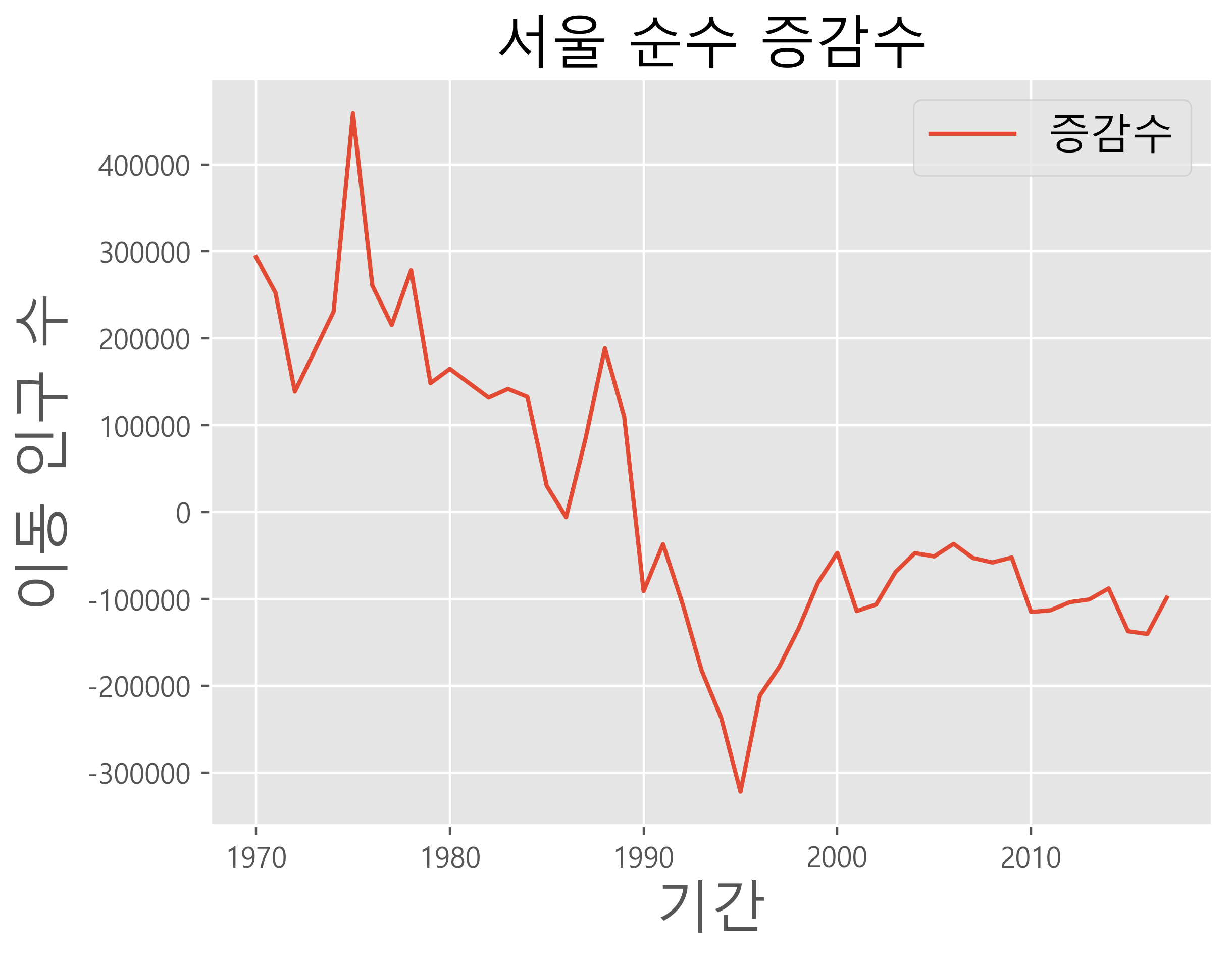
#증감수 컬럼 추가하기
df_seoul["증감수"] = df_seoul["전입건수"] - df_seoul["전출건수"]
print(df_seoul)

# 그래프 그리기
plt.rcParams['axes.unicode_minus']=False #음수표현. -
plt.style.use('ggplot')
df_seoul["증감수"].plot() #plot함수: 선그래프가 기본.
plt.title('서울 순수 증감수', size=20)
plt.ylabel('이동 인구 수', size=20)
plt.xlabel('기간', size=20)
plt.legend(loc='best', fontsize=15)
plt.show()
plt.savefig("20221205-2.png",dpi=400,bbox_inches="tight")
❓
import pandas as pd
df = pd.read_excel("data/남북한발전전력량.xlsx")
# 남한의 전력량만 조회
df = df.loc[:4] # 수력, 화력,원자력, 신재생 (0 ~ 4까지)
del df["전력량 (억㎾h)"] # 전력량 (억㎾h) 컬럼 제거하기
df.set_index("발전 전력별",inplace=True) # 발전 전력별 컬럼을 index로 설정하기
df = df.T # 전치행렬 : 행과 열을 변경
df.rename(columns={"합계":"총 발전량"},inplace=True) # 합계 컬럼을 총발전량 컬럼으로 변경하기
df["전년도 발전량"] = df["총 발전량"].shift(1) # 앞의 총발전량 데이터
df["증감률"] = ((df["총 발전량"] / df["전년도 발전량"]) -1) * 100 # 증감율 컬럼 추가

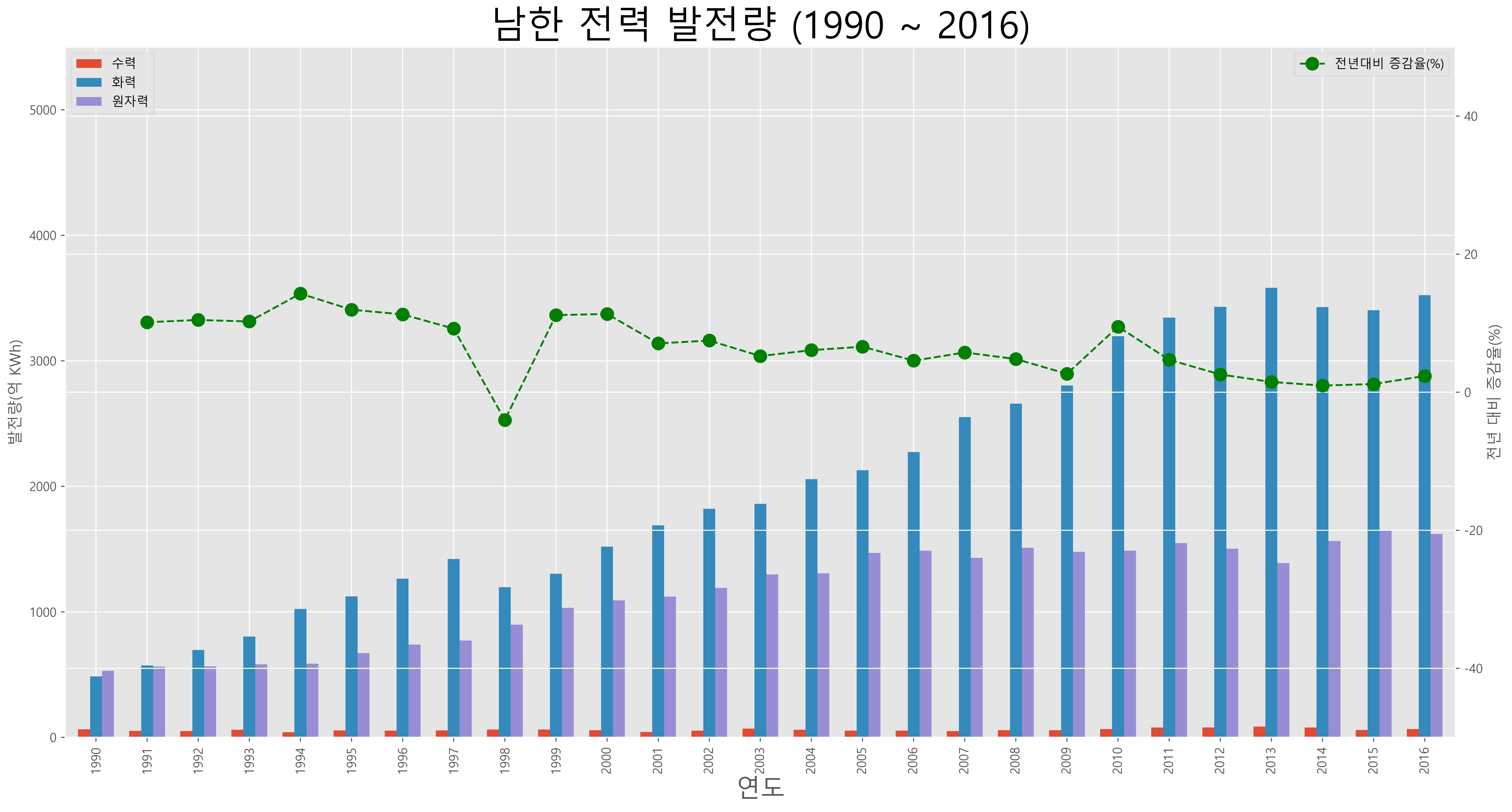
### 연합 그래프 작성
import matplotlib.pyplot as plt
plt.style.use("ggplot") # 그래프의 style 설정
plt.rc('font', family="Malgun Gothic") # 한글폰트 설정
plt.rcParams['axes.unicode_minus'] = False # 음수표시 - 설정
ax1 = df[['수력','화력','원자력']].plot(kind='bar', figsize=(5,10),
                           width=0.7, stacked=False)
ax2 = ax1.twinx() # 같은 그래프 영역으로 설정
ax2.plot(df.index, df.증감률,ls='--',marker='o', markersize=10,
         color='green',label='전년대비 증감울(%)')
ax1.set_ylim(0,5500) # 막대 그래프 y축의 값의 범위
ax2.set_ylim(-50,50) # 선그래프 y축의 값의 범위
ax1.set_xlabel('연도',size=20) # x축 값의 설명
ax1.set_ylabel('발전량(억 kwh)') # 막대그래프 y축 값의 설명
ax2.set_ylabel('전년 대비 증감율(%)') # 선그래프 y축 값의 설명
plt.title('남한 전력 발전량 (1990 ~ 2016)',size=30) # 전체 그래프의 제목
ax1.legend(loc='upper left') # 범례 : 왼쪽 위 위치
ax2.legend(loc='upper right') # 범례 : 오른쪽 위 위치
plt.savefig("20221205-3.png",dpi=400,bbox_inches="tight")
plt.show() # 화면에 표시


