3. Decision Tree
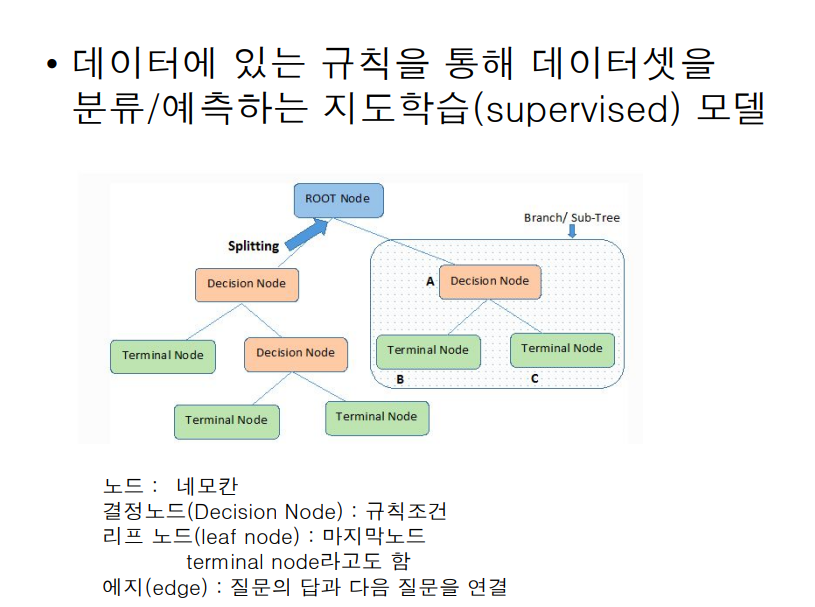
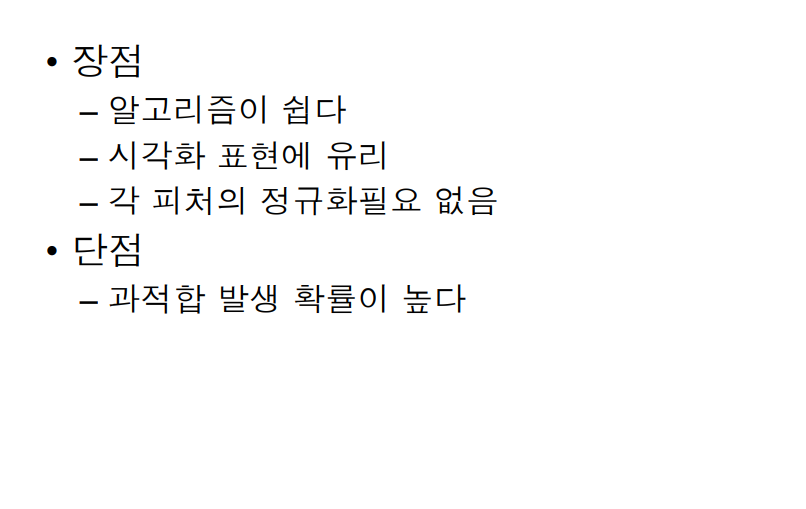
📌
########### 7. Decision Tree
'''
 분류 알고리즘
     KNN : 최근접 이웃알고리즘
     SVM : 선, 면을 이용하여 영역 분리
     Decision Tree : 의사결정나무
         노드(Node), 가지(Branch), 깊이(depth) : Tree구조
'''
# Decision Tree(의사결정나무)
# UCI 데이터 : 암세포 진단 데이터
# <https://archive.ics.uci.edu/ml/machine-learning-databases/breast-cancer-wisconsin/breast-cancer-wisconsin.data>
from sklearn import metrics
from sklearn import tree
from sklearn import preprocessing

uci_path="<https://archive.ics.uci.edu/ml/machine-learning-databases/breast-cancer-wisconsin/breast-cancer-wisconsin.data>"
# header=None : 기본은 0행을 header로 설정.
#        None : header 데이터가 없음(컬럼이 없다). 전부 데이터이다.
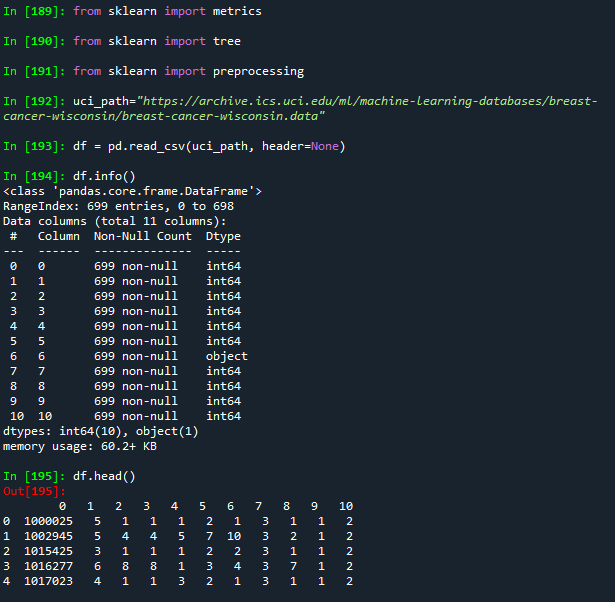
df = pd.read_csv(uci_path, header=None) # header 없이 모두 데이터. 컬럼명이 없음.
df.info()
df.head()
'''
컬럼설명
1.id : ID번호
2.clump : 덩어리 두께
3.cell_size : 암세포 크기
4.cell_shape:세포모양
5.adhesion : 한계
6.epithlial: 상피세포 크기
7.bare_nuclei : 베어핵
8.chromatin : 염색질
9.normal_nucleoli : 정상세포
10.mitoses : 유사분열
11.class : 2 (양성), 4(악성)
'''
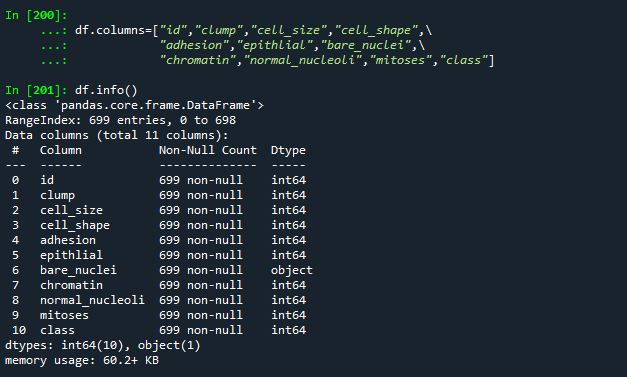
# df 데이터에 컬럼명 설정하기
df.columns=["id","clump","cell_size","cell_shape",\\
            "adhesion","epithlial","bare_nuclei",\\
            "chromatin","normal_nucleoli","mitoses","class"]
df.info()
# 양성, 악성 데이터 건수 조회하기
df['class'].value_counts()

# bare_nuclei 데이터 조회하기
df["bare_nuclei"].unique()

# bare_nuclei데이터에서 ?데이터 조회하기
df[df["bare_nuclei"] == '?'][["id","bare_nuclei","class"]]

# ? 포함한 행 삭제하기
# bare_nuclei 컬럼의 자료형을 정수형으로 변경하기

#1. ?를 결측값으로 바꾸기
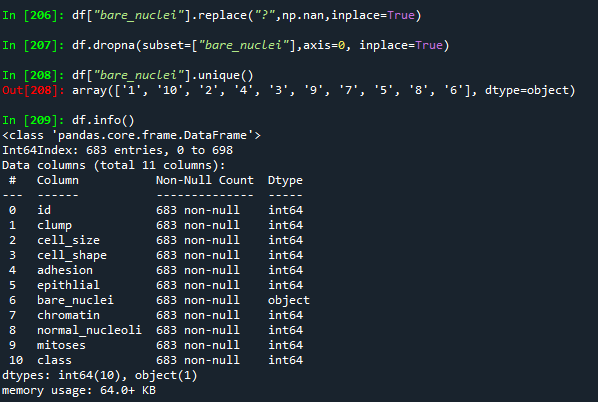
df["bare_nuclei"].replace("?",np.nan,inplace=True)
df[df["bare_nuclei"].isnull()]

#2. 결측값 행을 삭제
df.dropna(subset=["bare_nuclei"],axis=0, inplace=True)
df["bare_nuclei"].unique()
df.info()

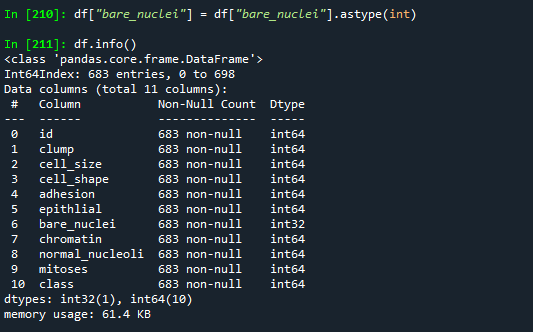
#3. 정수형으로 자료형 변경
df["bare_nuclei"] = df["bare_nuclei"].astype(int)
df.info()
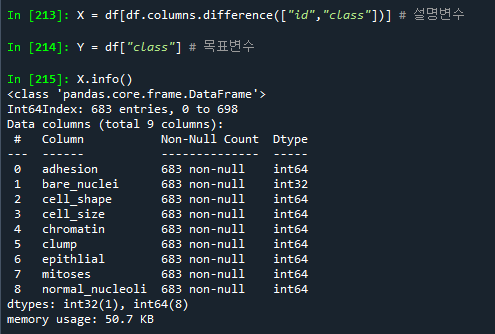
# 설명변수 : id, class 컬럼을 제외한 모든 컬럼
X = df[df.columns.difference(["id","class"])] # 설명변수
Y = df["class"] # 목표변수

X.info()
########### 정규화
# 설명변수 정규화 하기
from sklearn import preprocessing
import numpy as np
# 정규화 : 모든 컬럼들의 값의 범위를 일정하게 만들어줌.
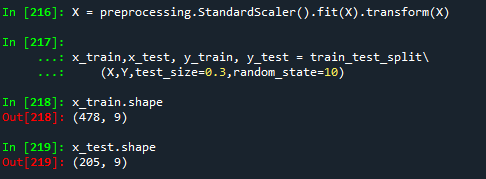
X = preprocessing.StandardScaler().fit(X).transform(X)

# 훈련/테스트 데이터 분리
x_train,x_test, y_train, y_test = train_test_split\\
    (X,Y,test_size=0.3,random_state=10)
x_train.shape
x_test.shape
# 알고리즘 선택
# criterion="entropy" : 불순도 설정.
#                       순수도에 도달 할 때 까지 반복
#    - entropy : 엔트로피값
#    - gini : 지니계수
#    - log_loss : 분산의 감소량을 최대화

# max_depth=5 : 트리의 깊이. 기본값 : None
#      트리의 깊이가 너무 깊어지면 과대적함이 발생 할 수 있다.
from sklearn import tree
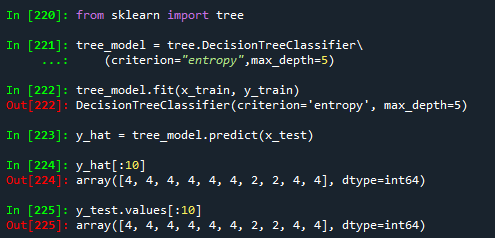
tree_model = tree.DecisionTreeClassifier\\
    (criterion="entropy",max_depth=5)
tree_model.fit(x_train, y_train)
y_hat = tree_model.predict(x_test)
y_hat[:10]
y_test.values[:10]
########### 혼동 행렬
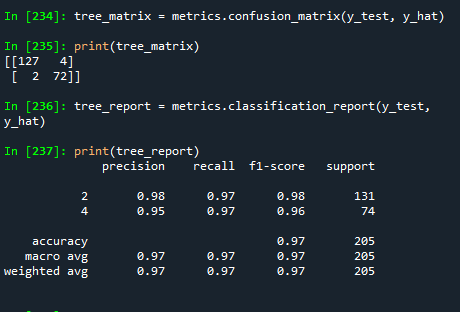
tree_matrix = metrics.confusion_matrix(y_test, y_hat)
print(tree_matrix)

########### 모형 성능 평가데이터
tree_report = metrics.classification_report(y_test, y_hat)
print(tree_report)
# 함수들을 이용하여 정확도, 정밀도, 재현율, f1_Score 값 출력하기
print(accuracy_score(y_test, y_hat)) # 결과 -> 0.9707317073170731
print(precision_score(y_test, y_hat)) # 오류. 0,1인 경우만 처리 가능
print(recall_score(y_test, y_hat)) # 오류. 0,1인 경우만 처리 가능
print(f1_score(y_test, y_hat)) # 오류. 0,1인 경우만 처리 가능
#####################
# 정밀도, 재현율, f1_score 함수로 출력하기
# class에서  2 -> 0, 4 -> 1
Y.replace(2,0,inplace=True) # 양성 : 0
Y.replace(4,1,inplace=True) # 음성 : 1

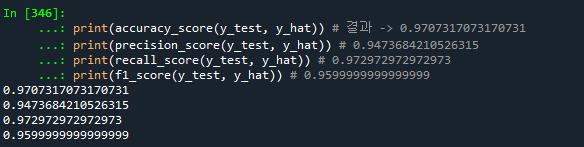
# 함수들을 이용하여 정확도, 정밀도, 재현율, f1_Score 값 출력하기
print(accuracy_score(y_test, y_hat)) # 결과 -> 0.9707317073170731
print(precision_score(y_test, y_hat)) # 0.9473684210526315
print(recall_score(y_test, y_hat)) # 0.972972972972973
print(f1_score(y_test, y_hat)) # 0.9599999999999999
'수업(국비지원) > Python' 카테고리의 다른 글
| [Python] 지도학습 예제 - titanic (0) | 2023.04.27 |
|---|---|
| [Python] 지도학습 예제 - 투수들의 연봉 예측하기2 (0) | 2023.04.26 |
| [Python] 머신러닝 - 지도학습(분류) 2. SVM (0) | 2023.04.26 |
| [Python] 머신러닝 - 지도학습(분류) 1. KNN (0) | 2023.04.26 |
| [Python] 머신러닝 - 지도학습(회귀분석)3 (0) | 2023.04.26 |


