'''
2022-12-01 복습
  pandas 모듈
   - 표형태(행 : index, 열 : cilumns)의 데이터를 처리하기 위한 모듈
   - Series : 1차원 형태의 데이터 처리. DataFrame의 한개의 컬럼값들의 자료형
   - DataFrame : 표형태의 데이터 처리. Series데이터의 모임
       - 기술통계함수 : sum,mean,median,max,min,srd,var,describe
       - 행의 값 : index
       - 열의 값 : columns
       - rename : index, columns의 값을 변경하는 함수.
                  inplace=True : 객체자체변경
       - drop : index, columns의 값을 제거하는 함수.
                 inplace=True : 객체자체변경

       - 얕은 복사 : df2 = df, df,df2 객체는 물리적으로 같은 객체.
       - 깊은 복사  :  df3 = df[:] , df4 = df.copy()

       - 한개의 컬럼 조회 : df["컬럼명"], df.컬럼명 => Series 객체
       - 여러개의 컬럼 조회 :  df[["컬럼1","컬럼2"]] => DataFrame객체
                             df["row1":"rown"] => DataFrame객체. 범위 지정
       - 행을 조회 : loc["인덱스명"],iloc[인덱스 순서]
       - 컬럼 => 인덱스 : set_index
       - 인덱스 => 컬럼 : reset_index

       - csv파일 읽기 : read_csv
       - csv파일 쓰기 : to_csv
       - excel파일 읽기 : read_excel
       - excel파일 쓰기 : ExcelWriter > to_excel > save
'''
📌
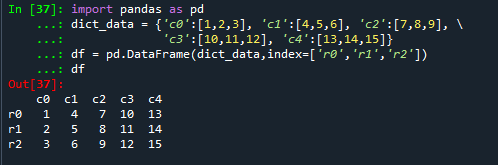
import pandas as pd
dict_data = {'c0':[1,2,3], 'c1':[4,5,6], 'c2':[7,8,9], \\
             'c3':[10,11,12], 'c4':[13,14,15]}
df = pd.DataFrame(dict_data,index=['r0','r1','r2'])
df
# 인덱스 r0,r1,r2,r3,r4 증가
df.index=['r0','r1','r2','r3','r4'] # 오류 : 행의 갯수가 맞지 않아서
# reindex() 함수 : 인덱스 재설정. 행의 추가
ndf = df.reindex(['r0','r1','r2','r3','r4'])
ndf
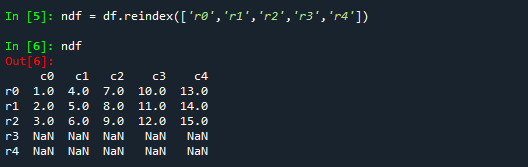
#NaN : 결측값.(값이없다) 결측값을 할것인지가 데이터조회의 시작
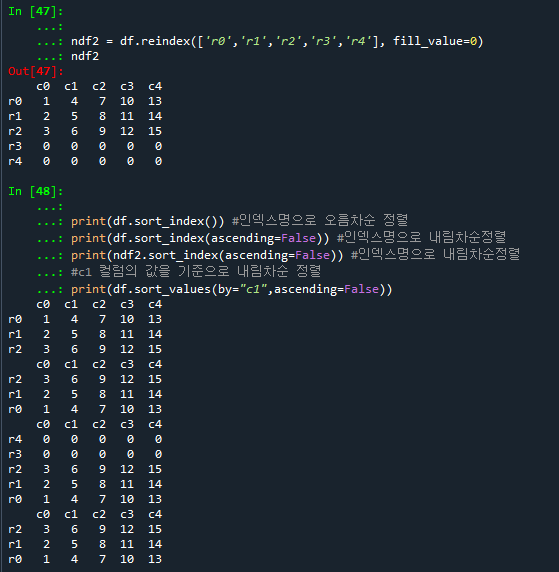
#fill_value=0 : 추가된 내용에 0값으로 채움
ndf2 = df.reindex(['r0','r1','r2','r3','r4', fill_value=0])
ndf2

#sort_index() : 인덱스명으로 정렬
#sort_values() : 기준컬럼의 값으로 정렬
print(df.sort_index()) #인덱스명으로 오름차순 정렬
print(df.sort_index(ascending=False)) #인덱스명으로 내림차순정렬
print(ndf2.sort_index(ascending=False)) #인덱스명으로 내림차순정렬
#c1 컬럼의 값을 기준으로 내림차순 정렬
print(df.sort_values(by="c1",ascending=False))
❓ # 문제
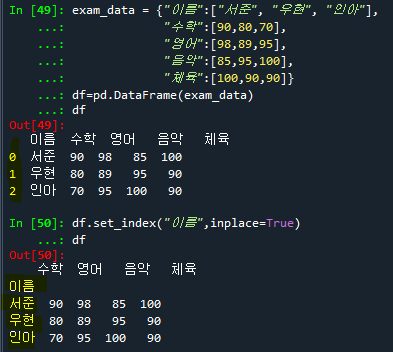
exam_data={"이름":["서준","우현","인아"],
           "수학":[90,80,70],
           "영어":[98,89,95],
           "음악":[85,95,100],
           "체육":[100,90,90]}
df = pd.DataFrame(exam_data)
df

#1. 이름 컬럼을 인덱스 설정하기
df.set_index("이름",inplace=True)
df

#2 이름의 역순으로 정렬하여 출력하기
df.sort_index(ascending=False,inplace=True)
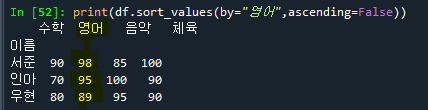
#3-1 영어점수의 역순으로 정렬하기
df.info()
print(df.sort_values(by="영어",ascending=False))
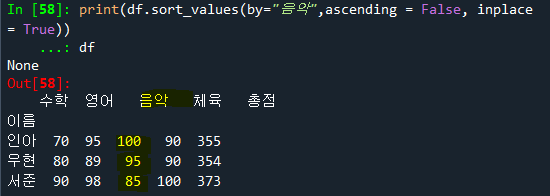
#3-2 음악점수의 역순으로 정렬하기
print(df.sort_values(by="음악",ascending = False, inplace = True))
df
#4 총점 컬럼을 생성하여, 총점의 역순으로 출력하기
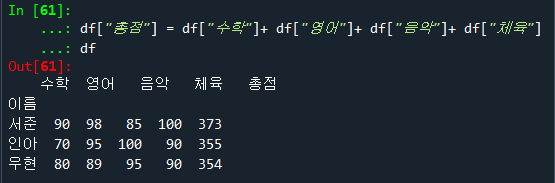
df["총점"] = df["수학"]+df["영어"]+df["음악"]+df["체육"]
df
df.sort_values(by="총점",ascending=False,inplace=True)
df
'수업(국비지원) > Python' 카테고리의 다른 글
| [Python] seaborn (조회, 정렬) (0) | 2023.04.25 |
|---|---|
| [Python] 상관 계수 , 빅 데이터 특징 (0) | 2023.04.25 |
| [Python] csv파일, 엑셀 파일 pandas 모듈로 읽기 (0) | 2023.04.25 |
| [Python] 얕은 복사, 깊은 복사 (0) | 2023.04.25 |
| [Python] Pandas - 기술 통계 (0) | 2023.04.25 |

