수업(국비지원)/Python
[Python] 한글 분석 예제 - 맛집 리뷰 용어 분석하기2
byeolsub
2023. 4. 27. 14:20
📌
#####################
# data/review_data.csv 읽어서 df에 저장하기
#####################
import pandas as pd
import numpy as np
import matplotlib.pyplot as plt
import seaborn as sns
import re
import time
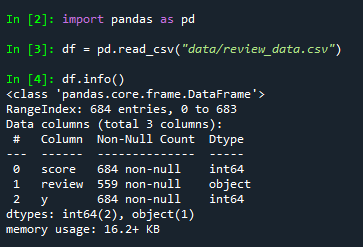
df = pd.read_csv("data/review_data.csv")
df.info()
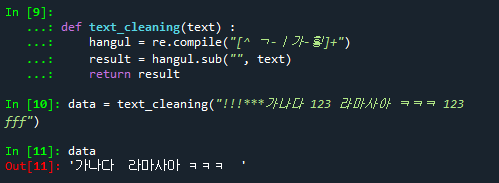
# 한글과 공백 부분만 전달해주는 함수 생성
def text_cleaning(text) :
    hangul = re.compile("[^ ㄱ-ㅣ가-힣]+")
    result = hangul.sub("", text)
    return result

data = text_cleaning("!!!***가나다 123 라마사아 ㅋㅋㅋ 123 fff")
data
# 리뷰에서 한글과 공백만 남김
df["ko_text"] = df["review"].apply(lambda x : text_cleaning(str(x)))
df.info()
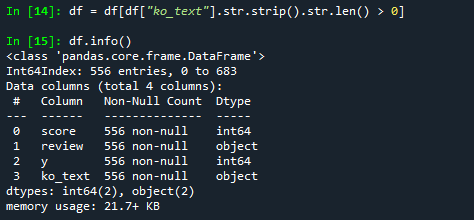
# ko_text컬럼의 내용이 있는 경우만 df에 다시 저장하기
# strip() : 양쪽에 있는 공백 제거
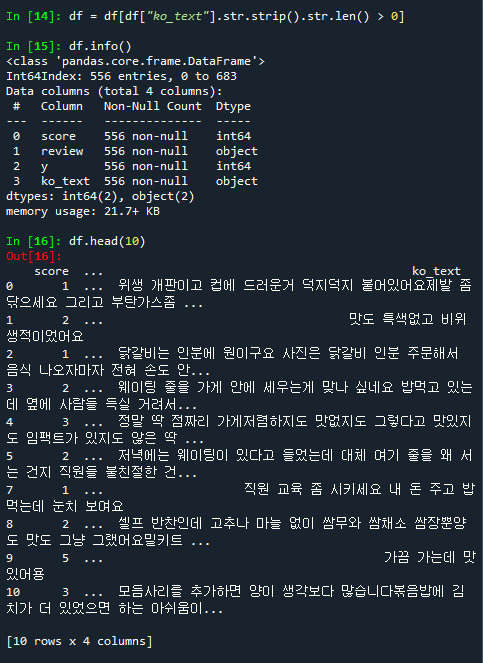
df = df[df["ko_text"].str.strip().str.len() > 0]
df.info()
df.head(10)

# review 컬럼 삭제 하기
del df["review"]
# 한글 형태소 분리
from konlpy.tag import Okt

def get_pos(x) :
    okt = Okt()
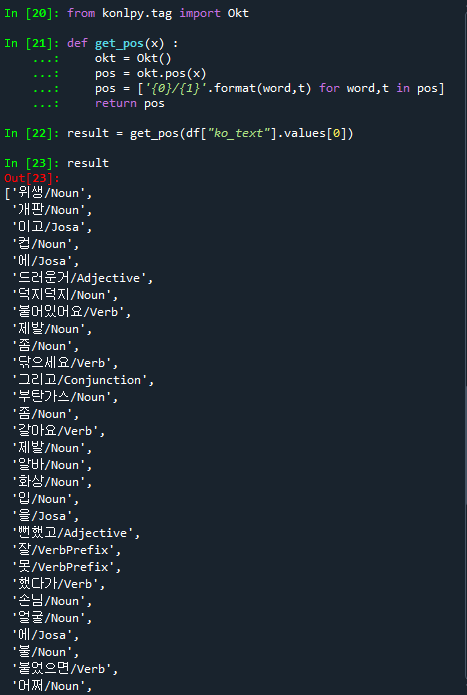
    pos = okt.pos(x) # 한글을 분석하여 형태소와 품사로 분리하는 함수
    # print(pos) :
    # word : 형태소, t :  품사 => {0}/{1} :  형태소/품사 형태로 표시
    # 컴프리핸션방식으로 리스트 객체 생성
    pos = ['{0}/{1}'.format(word,t) for word,t in pos]
    return pos
result = get_pos(df["ko_text"].values[0])
result
# 글뭉치 변환하기
from sklearn.feature_extraction.text import CountVectorizer
# CountVectorizer : 글뭉치. 분석을 위한 글의 모임.
index_vectorizer = CountVectorizer(tokenizer = lambda x : get_pos(x))
# df["ko_text"].tolist() : 분석할 한글 데이터 목록.
#                          ko_text 컬럼의 값들을 리스트
# 데이터 문장 한문장씩 형태소 분석을 해서 인덱스를 하나씩 설정함
'''
예시
 안녕 나는 홍길동 이야
  1   2     3     4      => 인덱스화
 반가워 나는 김삿갓 이야
   5     2     6    4

   1 2 3 4 5 6
   (2,6)
'''
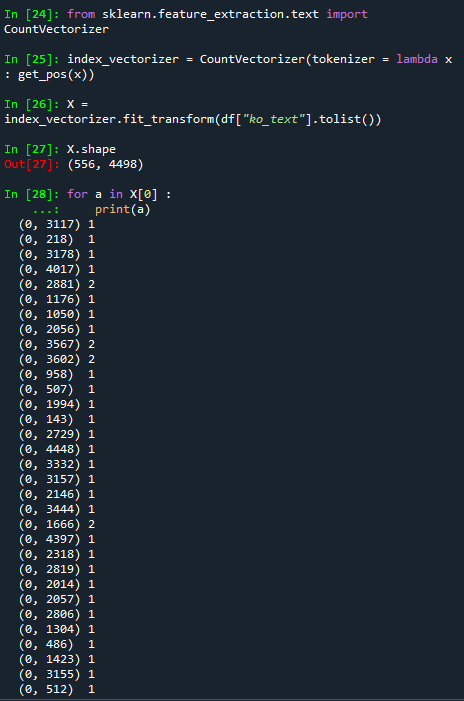
X = index_vectorizer.fit_transform(df["ko_text"].tolist())
X.shape # (556, 4498). (df의 행의 수와 동일, 단어의 수)
for a in X[0] :
    print(a)
#
'''
 TfidfTransformer
   TF-IDF(Term Frequency-Inverse Document Frequency)
   TF : 한문장에 등장하는 빈도수
      예시) 맛집 단어가 3번 등장 => TF의 값은 3
   IDF : 전체 문서에서 등장하는 단어 반도수의 역산
      예시) 전체 문서에서 맛집이라는 단어가 10번 등장 => 1/10 = 0.1

   TF-IDF :
       3 * 0.1 = 0.3
     => 전체 문서에서 많이 나타나지 않고, 현재 문장에서 많이 나타난다고 가정하면
        현재 문장에서 해당 단어의 중요성을 수치로 표현
'''
from sklearn.feature_extraction.text import TfidfTransformer
tfidf_vectorizer = TfidfTransformer()
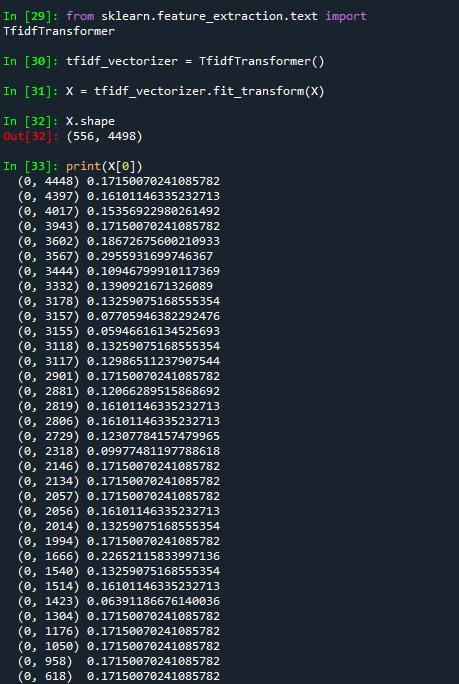
X = tfidf_vectorizer.fit_transform(X)
X.shape # (556, 4498). 578행, 4498열
print(X[0])
y = df["y"] # 0 : 부정, 1 : 긍정
y

# 훈련데이터/ 테스트데이터로 분리
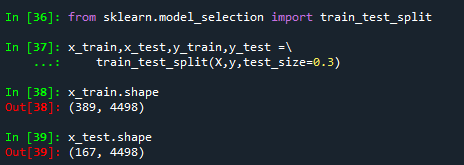
from sklearn.model_selection import train_test_split
x_train,x_test,y_train,y_test =\\
    train_test_split(X,y,test_size=0.3)
x_train.shape # (389, 4498)
x_test.shape # (167, 4498)
# Logistic Regression 알고리즘을 이용하여 분류
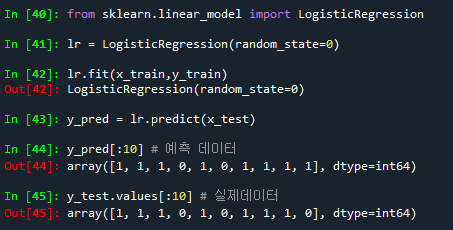
from sklearn.linear_model import LogisticRegression
lr = LogisticRegression(random_state=0)
lr.fit(x_train,y_train)
y_pred = lr.predict(x_test)
y_pred[:10] # 예측 데이터
y_test.values[:10] # 실제데이터
### 평가하기
# 혼동행렬
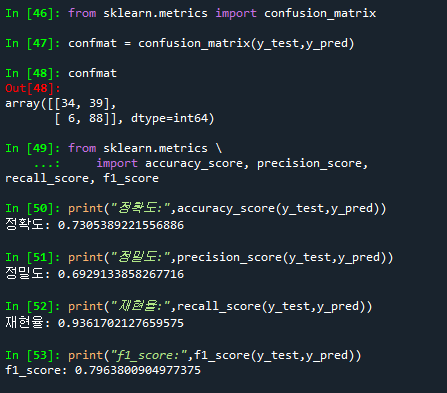
from sklearn.metrics import confusion_matrix
confmat = confusion_matrix(y_test,y_pred)
confmat

# 정확도, 정밀도, 재현율, f1-score 조회하기
from sklearn.metrics \\
    import accuracy_score, precision_score, recall_score, f1_score
print("정확도:",accuracy_score(y_test,y_pred))
print("정밀도:",precision_score(y_test,y_pred))
print("재현율:",recall_score(y_test,y_pred))
print("f1_score:",f1_score(y_test,y_pred))
#####
# 각각의 단어들 중 긍정적인 요소를 가지고 있는 단어와
#  부정적인 요소를 가진 단어를 구분하기

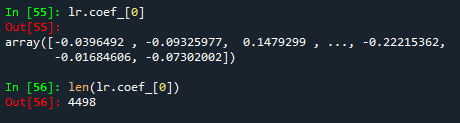
# 각 피처별로 가중치 값 조회하기
lr.coef_[0]
len(lr.coef_[0])
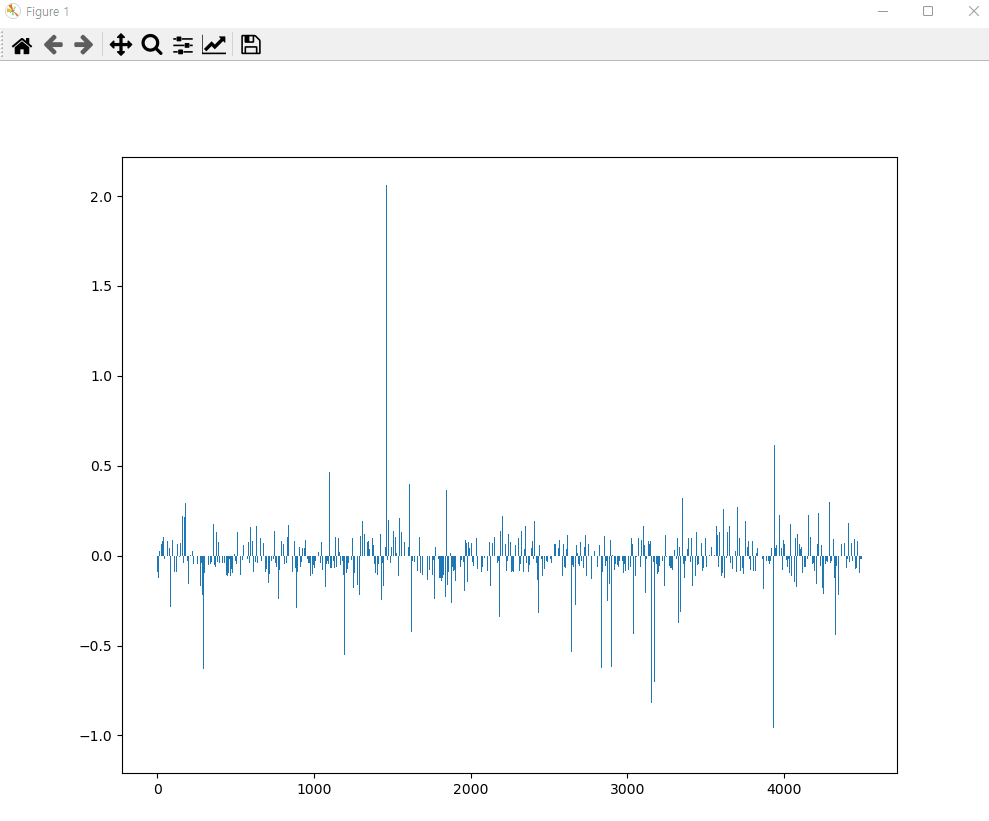
# 가중치 값을 그래프로 출력하기
plt.rcParams["figure.figsize"] = [10,8]
plt.bar(range(len(lr.coef_[0])), lr.coef_[0])
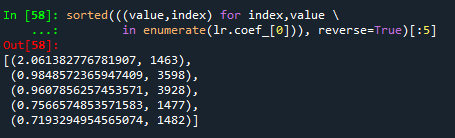
# 긍정의 가중치 값 5개 :
#  가중치 계수를 내림차순으로 정렬하여 최상위 5개 값
sorted(((value,index) for index,value \\
        in enumerate(lr.coef_[0])), reverse=True)[:5]
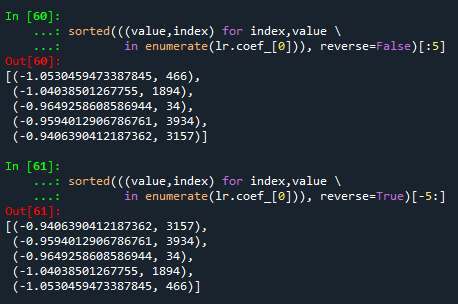
# 부정의 가중치 값 5개 :
#  가중치 계수를 오름차순으로 정렬하여 최상위 5개 값
#1
sorted(((value,index) for index,value \\
        in enumerate(lr.coef_[0])), reverse=False)[:5]

#2
sorted(((value,index) for index,value \\
        in enumerate(lr.coef_[0])), reverse=True)[-5:]
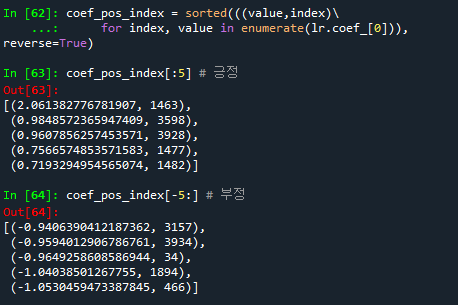
# 회귀계수값으로 정렬하기
coef_pos_index = sorted(((value,index)\\
     for index, value in enumerate(lr.coef_[0])), reverse=True)
coef_pos_index[:5] # 긍정
coef_pos_index[-5:] # 부정
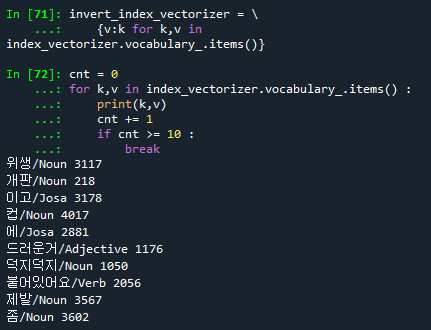
# index_vectorizer : 단어들을 인덱스화 한 객체
# index_vectorizer.vocabulary_ : 딕셔너리객체
# (k(형태소 단어),v(형태소 단어의 인덱스))

# index_vectorizer : 딕셔너리 객체
# (k(형태소 단어의 인덱스),v(형태소 단어))
invert_index_vectorizer = \\
    {v:k for k,v in index_vectorizer.vocabulary_.items()}

cnt = 0
for k,v in index_vectorizer.vocabulary_.items() :
    print(k,v)
    cnt += 1
    if cnt >= 10 :
        break
# invert_index_vectorize : {형태소인덱스 : 형태소 단어값}
# 딕셔너리 객체
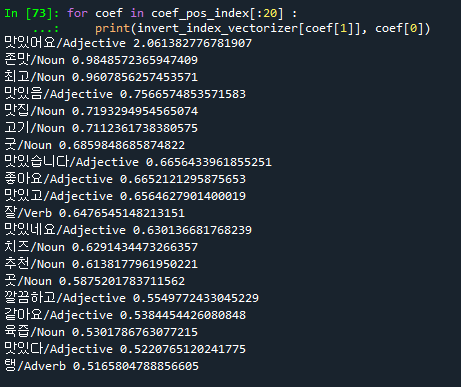
# 상위 20개의 긍정형태소 출력하기
# coef_pos_index: 각 회귀계수의 내림차순으로 정렬된 데이터
for coef in coef_pos_index[:20] :
    print(invert_index_vectorizer[coef[1]], coef[0])

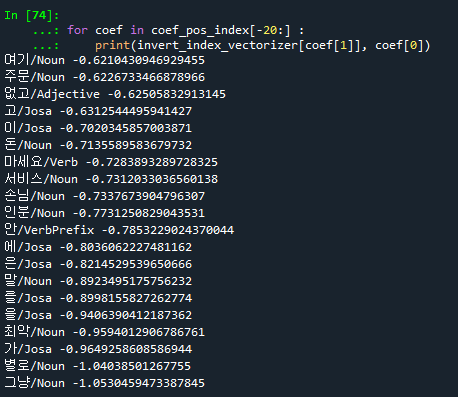
# 하위 20개 부정 형태소 출력하기
for coef in coef_pos_index[-20:] :
    print(invert_index_vectorizer[coef[1]], coef[0])
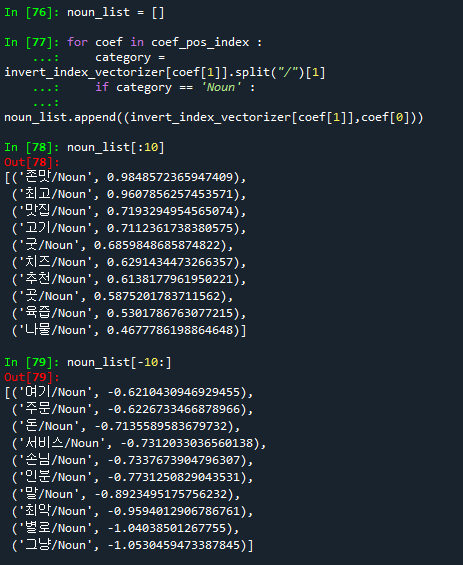
## 명사(Noun) 기준으로 긍정단어 10개, 부정단어 10개의 단어를 출력하기
noun_list = []

for coef in coef_pos_index :
    category = invert_index_vectorizer[coef[1]].split("/")[1]
    if category == 'Noun' :
        noun_list.append((invert_index_vectorizer[coef[1]],coef[0]))

noun_list[:10] # 긍정 단어 10개
noun_list[-10:] # 부정단어 10개
## 형용사(Adjective) 기준으로 긍정단어 10개, 부정단어 10개의 단어를 출력하기
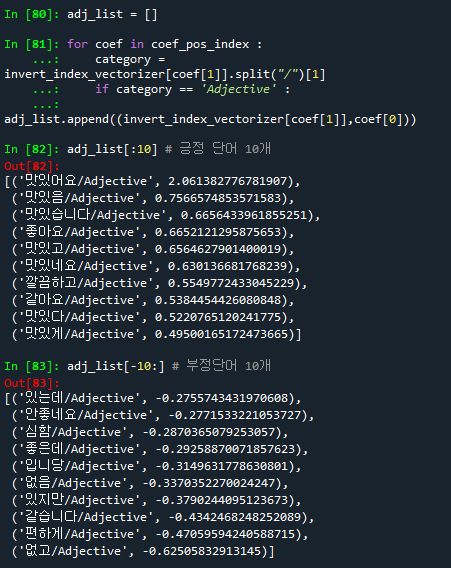
adj_list = []

for coef in coef_pos_index :
    category = invert_index_vectorizer[coef[1]].split("/")[1]
    if category == 'Adjective' :
        adj_list.append((invert_index_vectorizer[coef[1]],coef[0]))

adj_list[:10] # 긍정 단어 10개
adj_list[-10:] # 부정단어 10개