수업(국비지원)/Python
[Python] drinks.csv 파일 분석하기3
byeolsub
2023. 4. 26. 21:48
#################################
# 전세계 음주 데이터 분석하기 : drinks.csv
import pandas as pd
drinks = pd.read_csv("data/drinks.csv")
drinks.info()
'''
  country : 국가명
  beer_servings : 맥주소비량
  spirit_servings : 음료소비량
  wine_servings : 와인소비량
  total_litres_of_pure_alcohol : 순수 알콜량
  continent : 대륙명
'''
drinks.head()
📌
################
import numpy as np
import matplotlib.pyplot as plt
#대한민국은 얼마나 술을 독하게 마시는 나라인가?

#전체토탈 소비량
# total_servings : 모든 소비량의 합
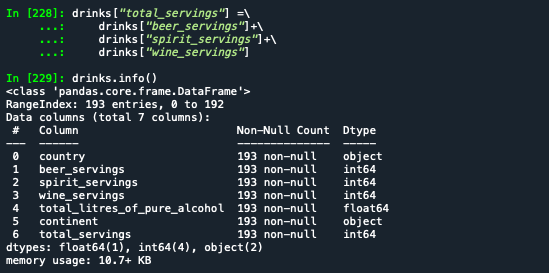
drinks["total_servings"] =\\
    drinks["beer_servings"]+\\
    drinks["spirit_servings"]+\\
    drinks["wine_servings"]
drinks.info()
# alcohol_rate : 알콜 비율 (알콜섭취량 / 전체주류소비량) 추가
drinks["alcohol_rate"] =\\
    drinks["total_litres_of_pure_alcohol"] / drinks["total_servings"]

drinks.info()
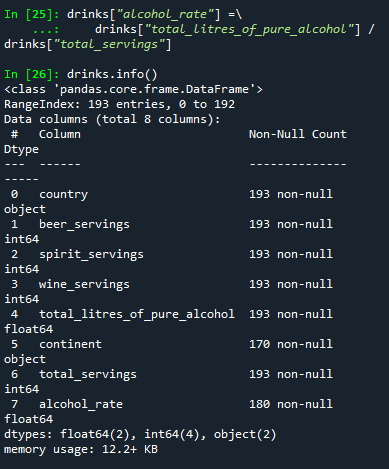
# alcohol_rate 컬럼에 결측값 존재.
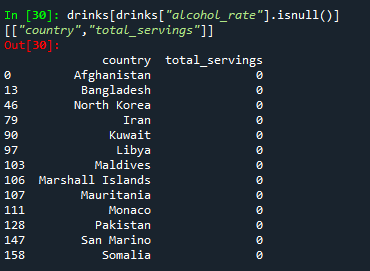
# why? 전체 주류 소비량이 0인 경우도 있음. 0으로 나누어 지면 불능.(생성 불가)
#                                          => 결측값
# alcohol_rate 컬럼의 값이 결측값인 레코드 조회하기
drinks[drinks["alcohol_rate"].isnull()][["country","total_servings"]]
# alcohol_rate 컬럼의 결측값을 0으로 치환
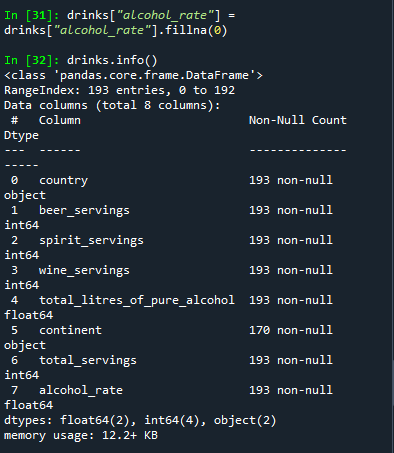
drinks["alcohol_rate"] = drinks["alcohol_rate"].fillna(0)
drinks.info()
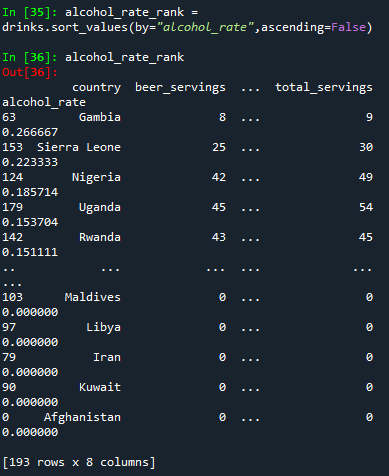
# alcohol_rate의 값으로 내림차순 정렬하기. alcohol_rate_rank 저장
alcohol_rate_rank = drinks.sort_values(by="alcohol_rate",ascending=False)
alcohol_rate_rank
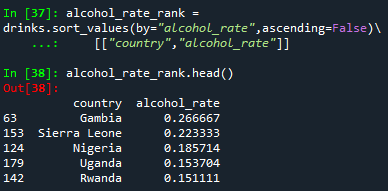
# 나라와 알콜비율만 조회
alcohol_rate_rank = drinks.sort_values(by="alcohol_rate",ascending=False)\\
    [["country","alcohol_rate"]]
alcohol_rate_rank.head()
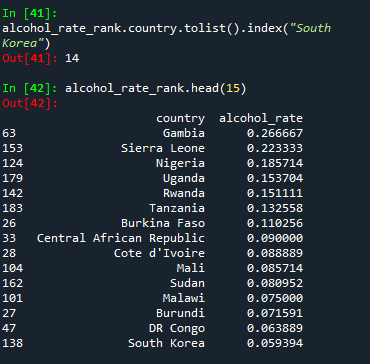
# 대한민국의 순번 출력하기
# 리스트로 변형하여 index로 찾는다.
alcohol_rate_rank.country.tolist().index("South Korea")
alcohol_rate_rank.head(15)
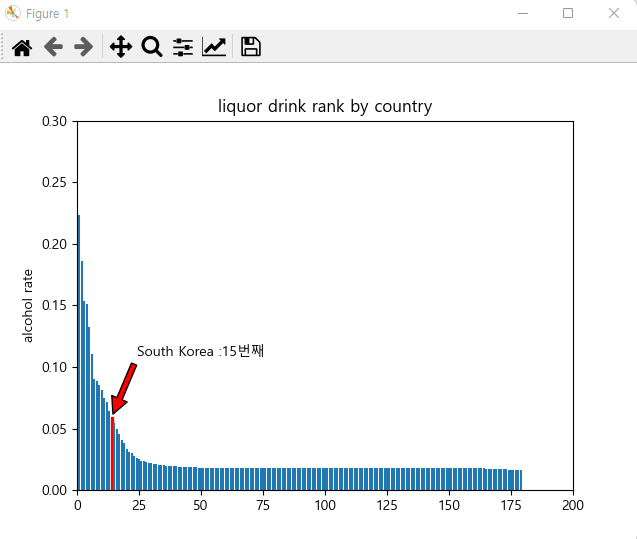
📌 시각화 하기
# 시각화 하기
import numpy as np
import matplotlib.pyplot as plt
plt.rc("font", family="Malgun Gothic")
# 국가명 목록
country_list = alcohol_rate_rank.country.tolist()
x_pox = np.arange(len(country_list)) # x축의 값.
rank = alcohol_rate_rank.alcohol_rate.tolist() # 막대그래프 y축의 값
# 막대그래프
# bar_list : 막대 목록
bar_list = plt.bar(x_pox, rank)
# 대한민국 막대의 색을 red로 변경
bar_list[country_list.index("South Korea")].set_color('r')
plt.ylabel('alcohol rate')
plt.title('liquor drink rank by country')

# (x축값의 시작, x축 종료, y축 시작, y축 종료)
plt.axis([0,200,0,0.3])

# 대한민국의 인덱스순서. 대한민국의 x축 값
korea_rank = country_list.index("South Korea")

# 대한민국의 알콜비율. 대한민국의 y축 값
korea_alc_rate =\\
    alcohol_rate_rank[alcohol_rate_rank['country'] == 'South Korea']\\
    ['alcohol_rate'].values[0]

# annotate : 그래프에 설명선 추가
plt.annotate('South Korea :' + str(korea_rank + 1) + "번째", # 설명문
             xy=(korea_rank, korea_alc_rate), # x,y축 설정
             xytext=(korea_rank + 10, korea_alc_rate + 0.05 ), # 설명문 시작점
             arrowprops=dict(facecolor='red', shrink=0.05)) # 화살표설정(색상:red)
                                                            # 길이 : 0.05