수업(국비지원)/Python
[Python] 시각화 - seaborn 모듈을 이용한 그래프(distplot,kdeplot,histplot 등)
byeolsub
2023. 4. 25. 13:15
'''
2022-12-05 복습
  pandas 함수
    info() : 기본정보를 제공. 컬럼이 몇개고 인덱스가 몇개이며
             notnull이 몇개인지 등 알 수 있다.

    unique() : 중복없이 한개의 데이터만 조회.
    value_counts() : 데이터별 등록된 건수.
                     건수의 내림차순으로 정렬.
    groupby(컬럼명) : 컬럼의 값으로 레코드를 그룹화.
                      Oracle이랑 비슷.(컬럼을 기준으로 그룹화)
                      그룹별 통계자료 조회 가능.
   # 시각화 과정 -------------------------------
    seaborn 모듈을 이용한 그래프
       regplot : 산점도 + 회귀선. 선형회귀분석(머신러닝의 하나의 알고리즘으로 들어간다.)
'''
📌
import seaborn as sns
import matplotlib.pyplot as plt
titanic = sns.load_dataset("titanic")

# 히스토그램 작성하기
# 하나의 영역에 3개의 그래프를 작성
fig = plt.figure(figsize=(15,5))
ax1 = fig.add_subplot(1,3,1) # 1행 3열 첫번째 영역
ax2 = fig.add_subplot(1,3,2) # 1행 3열 두번째 영역
ax3 = fig.add_subplot(1,3,3) # 1행 3열 세번째 영역
'''
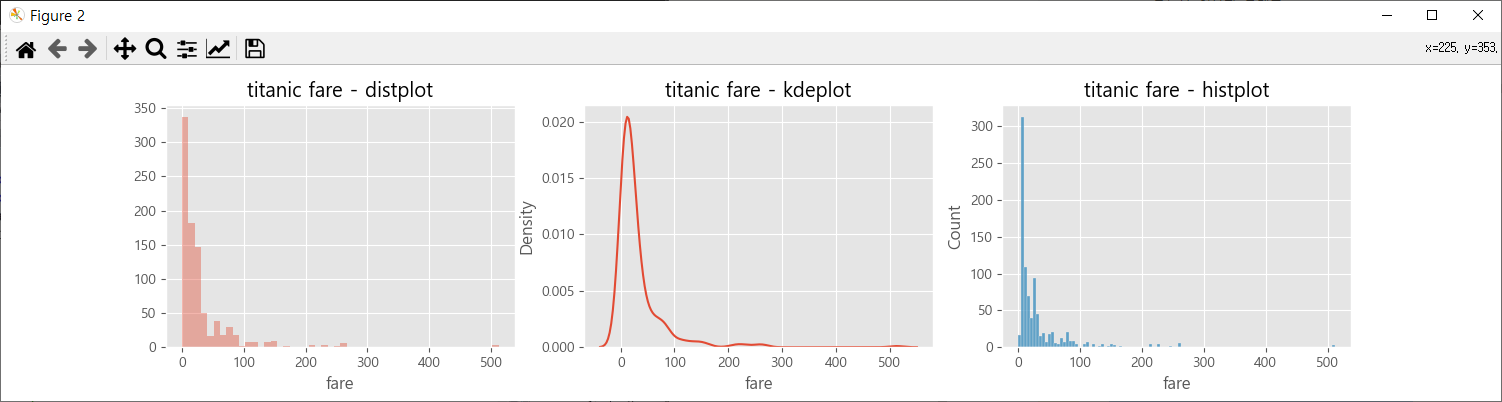
 sns.distplot : 밀도, 빈도수 함께 출력
                kde=False 지정하면 빈도수만 출력
 sns.kdeplot : 밀도를 출력하는 그래프
 sns.histplot : 빈도수 출력 그래프
'''
# kde(밀도). kde=True : 밀도와 빈도수(hist) 같이 출력.
sns.distplot(titanic['fare'], kde=False, ax=ax1)
sns.kdeplot(x='fare',data=titanic, ax=ax2)
sns.histplot(x='fare',data=titanic, ax=ax3)

ax1.set_title('titanic fare - distplot')
ax2.set_title('titanic fare - kdeplot')
ax3.set_title('titanic fare - histplot')
plt.show()
📌
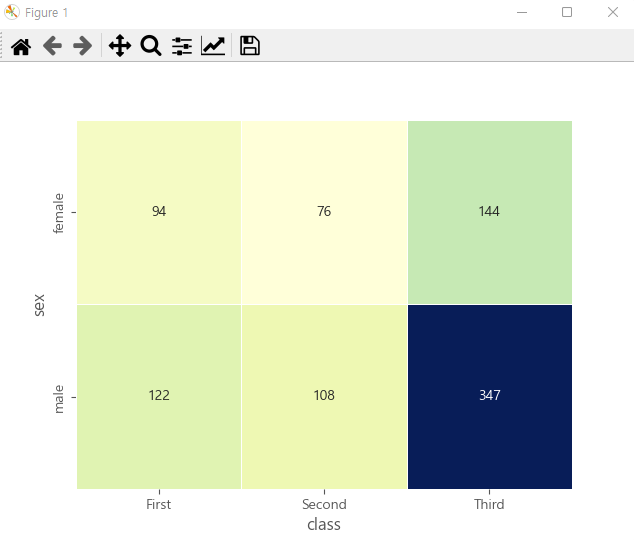
# 히트맵 그래프 : 범주형 데이터의 수치를 색상과 값으로 표시
# pivot_table : 2개의 범주형(값이 딱 떨어지는 1학년, 2학년... 혹은 성별 같은)데이터를
#               행과 열로 재구분
# aggfunc='size' : 데이터의 갯수
table = titanic.pivot_table(index=['sex'], columns=['class'], aggfunc='size')
table

# 성별인원수
titanic.sex.value_counts()

# 등급별 인원수
titanic['class'].value_counts()

# 성별,등급별 인원수
titanic[['sex','class']].value_counts()

'''
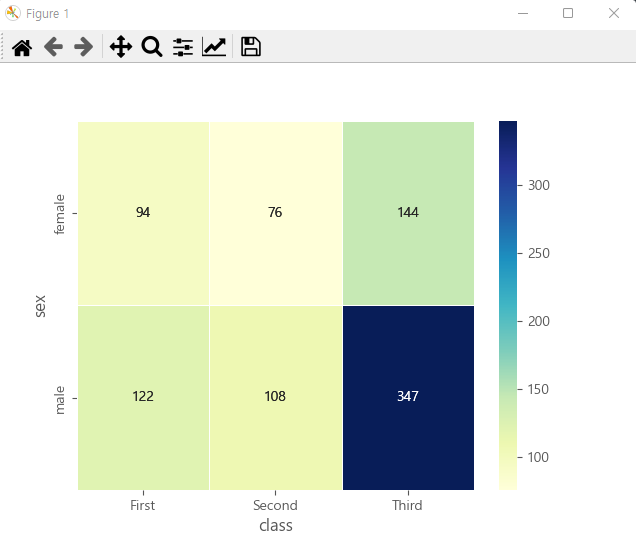
  table : 표시할 데이터값
  annot=True/False : 데이터값 표시여부. 표시/표시안함
  fmt='d' : d는 형식 문자. 10진 정수로 표시
  cmap='YlGnBu' : 생상표 설정
  linewidth=.5 : 여백. 히트맵 사이의 선의 간격
  cbar=True/False : 컬러바 표시여부. 표시/표시안함
'''
sns.heatmap(table,annot=True, fmt='d',
            cmap='YlGnBu', linewidth=.5, cbar=False)
plt.show()
sns.heatmap(table,annot=True, fmt='d',
            cmap='YlGnBu', linewidth=.5, cbar=True)
plt.show()
📌
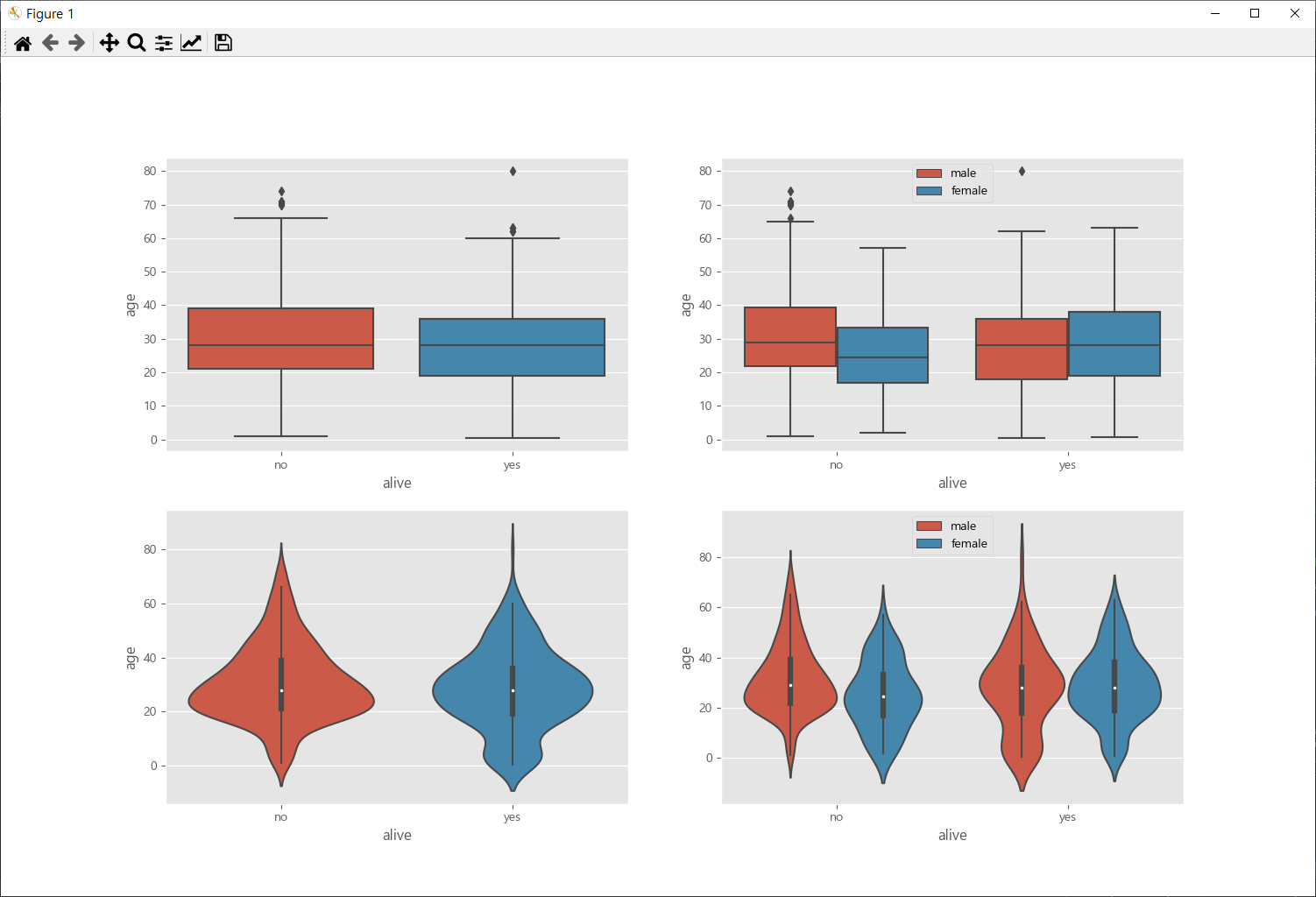
### 박스 그래프 : boxplot
# 하나의 영역에 4개의 그래프를 만듬
fig = plt.figure(figsize=(10,8))
ax1 =fig.add_subplot(2,2,1)
ax2 =fig.add_subplot(2,2,2)
ax3 =fig.add_subplot(2,2,3)
ax4 =fig.add_subplot(2,2,4)
'''
boxplot : box그래프 줄력. 값의 범주를 그래프로 출력
 data=titanic : 데이터 변수명.
 x='alive', y='age' : titanic의 컬럼명.
 hue='sex' : 성별을 기준으로 분리.

violinplot : 값의 범주 + 분포도를 표시.
             가로길이가 넓은 부분은 분포가 많은 수치를 의미.

들어가 있는 값들은 똑같다. 다만 분포도까지 표시를 해주느냐 해주지 않느냐로 갈림.
'''
sns.boxplot(x='alive', y='age', data=titanic, ax=ax1)
sns.boxplot(x='alive', y='age', hue='sex', data=titanic, ax=ax2)
sns.violinplot(x='alive', y='age', data=titanic, ax=ax3)
sns.violinplot(x='alive', y='age', hue='sex', data=titanic, ax=ax4)

ax2.legend(loc="upper center")
ax4.legend(loc="upper center")
plt.show()
📌
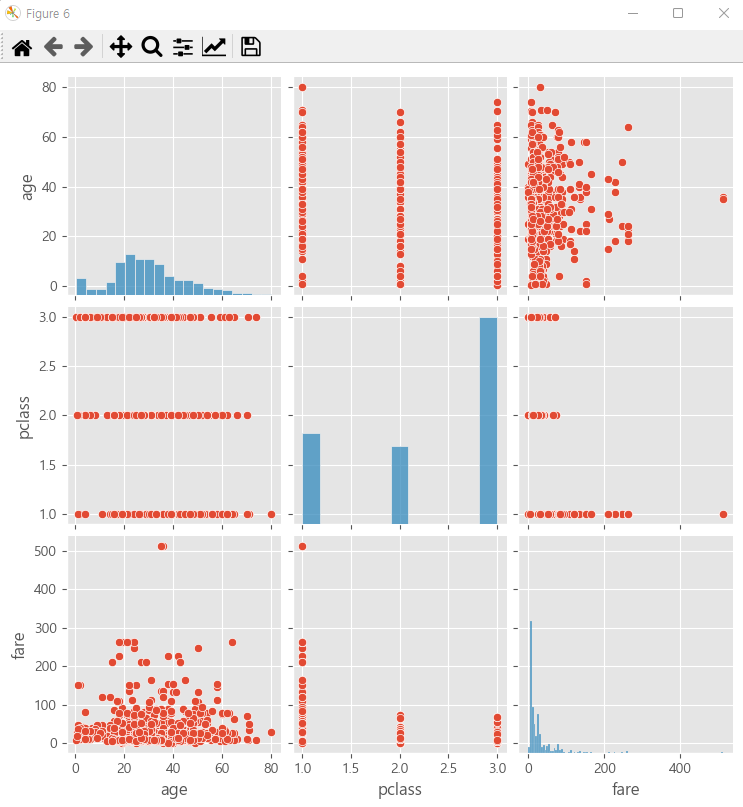
# pairplot : 각각의 컬럼별 데이터 분포 그리기
#            각변수(컬럼)들의 산점도 출력
#            대각선위치의 그래프는 히스토그램으로 표시
titanic_pair = titanic[["age","pclass","fare"]]
titanic_pair
sns.pairplot(titanic_pair) # 산전도와 히스토그램을 같이 그려준다.
📌
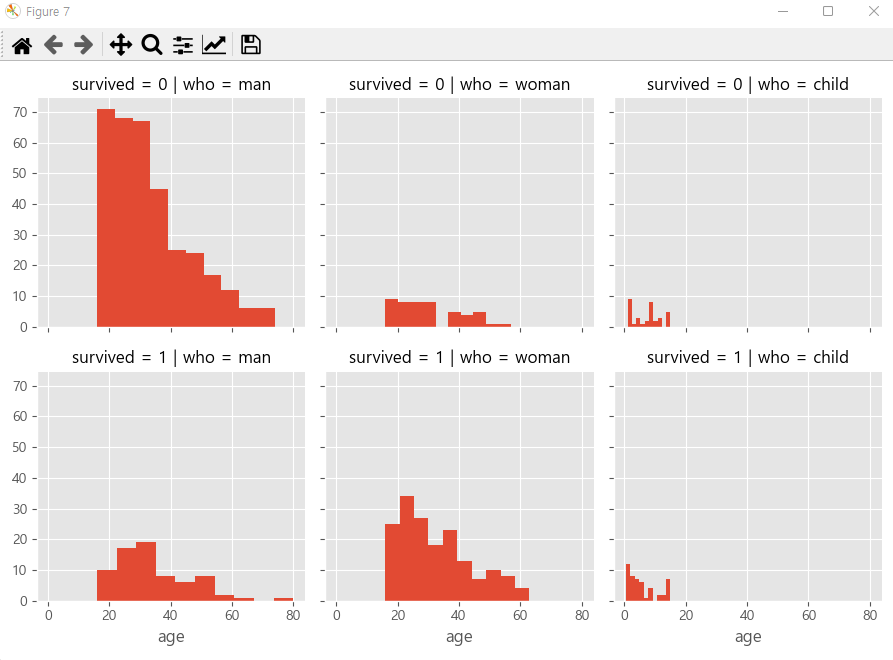
# FacetGrid : 조건(컬럼의 값)에 따라 그리드 나누기.
#             컬럼의 값(범주형 데이터)에 따라서 여러개의 그래프를 출력
g = sns.FacetGrid(data=titanic, col='who', row='survived')
g = g.map(plt.hist, 'age') # age 컬럼의 히스토그램 출력