수업(국비지원)/Ajax
[AJAX] 선 그래프, 파이 그래프, 도넛 그래프, barline 그래프
byeolsub
2023. 4. 21. 22:59
- 선 그래프
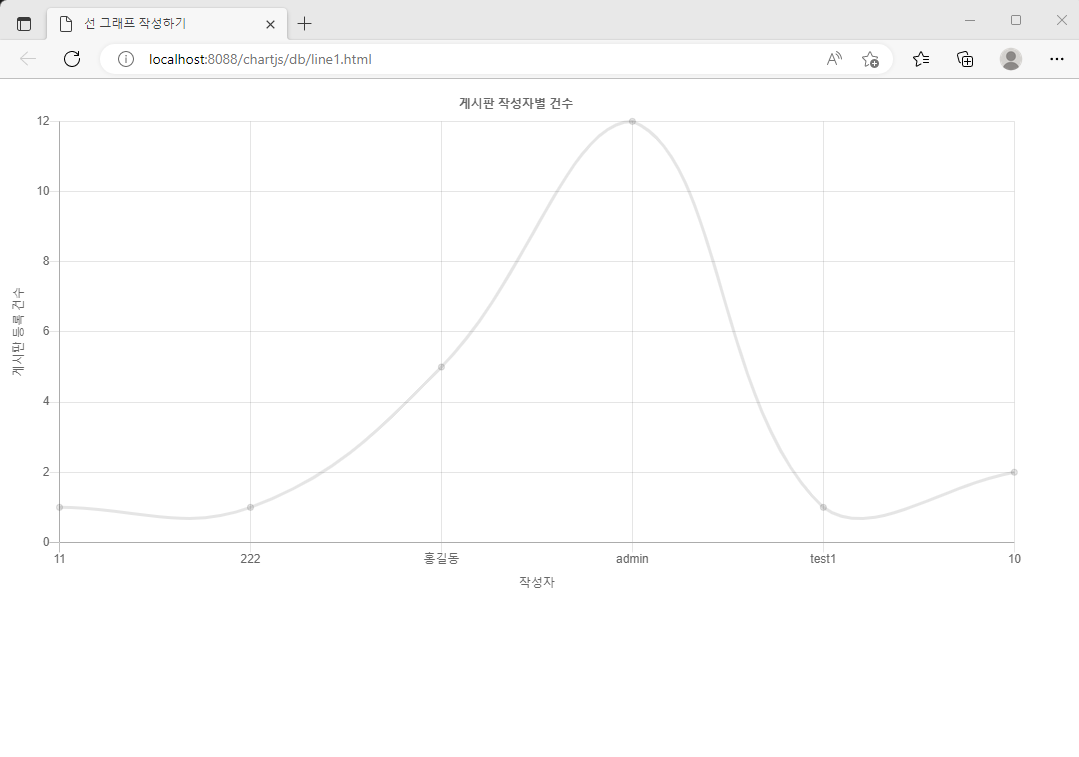
📌 line1.html 생성
<!DOCTYPE html>
<!-- /chartjs/src/main/webapp/db/line1.html -->
<html>
<head>
<meta charset="UTF-8">
<title> 선 그래프 작성하기 </title>
<script type="text/javascript"
  src="https://cdnjs.cloudflare.com/ajax/libs/Chart.js/2.9.4/Chart.min.js"></script>
<script type="text/javascript" src="http://ajax.googleapis.com/ajax/libs/jquery/3.5.1/jquery.min.js"></script>
<style>
  /* 도화지 : 그림을 그려주는 영역 */
  canvas { /* 글씨등이 선택 되지 않도록 설정 */
    -moz-user-select : none; /* 파이어폭스 브라우저 */
    -webkit-user-select : none; /* 사파리 브라우저 */
    -ms-user-select : none;   /* IE 브라우저 */
    user-select : none;       /* 표준 브라우저 */
  }
</style>
</head>
<body>
<div id="container" style="width:95%;">
  <canvas id="canvas"></canvas>  <!-- chartjs에 의해 그래프 출력 영역  -->
</div>
<script type="text/javascript">
let randomColorFactor = function() {
	return Math.round(Math.random() * 255); //0~255사이의 임의의 값
}
let randomColor = function(opacity) { //실행 할때 마다 다른 색상이 표시될 수 있도록.
	//rgba(red,green,blue,opacity(투명도))
	return "rgba(" + randomColorFactor() +","
			+ randomColorFactor() + ","
			+ randomColorFactor() + ","
			+ (opacity || '.3') + ")"; // 투명도 : 1 = 불투명, 0 = 투명
};
$(function() {
	$.ajax({
		url : "/chartjs/select",
		success : function(data) {
			chart_rtn(data);
		}
	})
})
function char_rtn(data) {
	let cxt = document.getElementById("canvas")
	let json = JSON.parse(data);
	console.log(data)
	let datas = json.datas
	let writers = json.writers;
	let colors = []
	$.each(datas,function(i,item) {
		colors[i] = randomColor(1)
	})
	const lineCharData = {
		labels : writers,
		datasets :[{
			fill : false, //선 하단의 영역을 색칠하지 않는다는 표시
//			borderColor :"#FF90FF", //선의 색상.
			borderColor : colors, //각 지점의 색상을 달리 설정 가능
			boardWidth : 1, //선의 굵기
			data : datas
		}]
	}
	new Chart(cxt,{
		type : 'line', //그래프의 종류
		data : lineCharData,
		options : {
			response : true,
			legend : {display : false},
			title : {display : true, text : '게시판 작성자별 건수'},
			scales :{
				xAxes :[{
					scaleLabel : {labelString : "작성자", display : true}
				}],
				yAxes :[{
					scaleLabel : {labelString : "게시판 등록 건수", display : true},
				    ticks : {beginAtzero : true}
				}]
			}
		}
	})
}
</script>
</body>
</html>- 파이 그래프
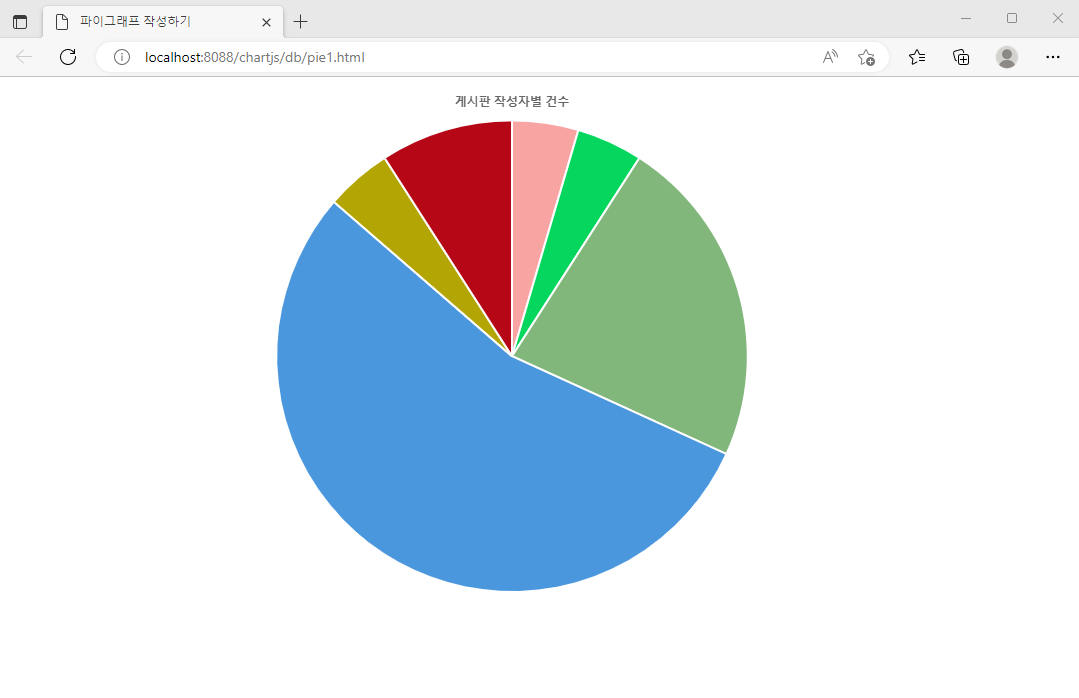
📌 pie1.html 생성
<!DOCTYPE html>
<!-- /chartjs/src/main/webapp/db/pie1.html  -->
<html>
<head>
<meta charset="UTF-8">
<title>파이그래프 작성하기</title>
<script type="text/javascript"
  src="https://cdnjs.cloudflare.com/ajax/libs/Chart.js/2.9.4/Chart.min.js"></script>
<script type="text/javascript" src="http://ajax.googleapis.com/ajax/libs/jquery/3.5.1/jquery.min.js"></script>
<style>
  /* 도화지 : 그림을 그려주는 영역 */
  canvas { /* 글씨등이 선택 되지 않도록 설정 */
    -moz-user-select : none; /* 파이어폭스 브라우저 */
    -webkit-user-select : none; /* 사파리 브라우저 */
    -ms-user-select : none;   /* IE 브라우저 */
    user-select : none;       /* 표준 브라우저 */
  }
</style>
</head>
<body>
<div id="container" style="width:95%;">
  <canvas id="canvas"></canvas>  <!-- chartjs에 의해 그래프 출력 영역  -->
</div>
<script type="text/javascript">
let randomColorFactor = function() {
	return Math.round(Math.random() * 255); //0~255사이의 임의의 값
}
let randomColor = function(opacity) { //실행 할때 마다 다른 색상이 표시될 수 있도록.
	//rgba(red,green,blue,opacity(투명도))
	return "rgba(" + randomColorFactor() +","
			+ randomColorFactor() + ","
			+ randomColorFactor() + ","
			+ (opacity || '.3') + ")"; // 투명도 : 1 = 불투명, 0 = 투명
};
$(function() {
	$.ajax({
		url : "/chartjs/select",
		success : function(data) {
			chart_rtn(data);
		}
	})
})
function char_rtn(data) {
	let cxt = document.getElementById("canvas")
	let json = JSON.parse(data);
	console.log(data)
	let datas = json.datas
	let writers = json.writers;
	let colors = []
	$.each(datas,function(i,item) {
		colors[i] = randomColor(1)
	})
	const pieCharData = {
		labels : writers,
		datasets :[{
			backgroundColor : colors,
			data : datas
		}]
	}
	new Chart(cxt,{
		type : 'pie', //그래프의 종류
		data : pieCharData,
		options : {
			response : true,
			legend : {display : false},
			title : {display : true, text : '게시판 작성자별 건수'},
			}
	})
}
</script>
</body>
</html>- 도넛 그래프
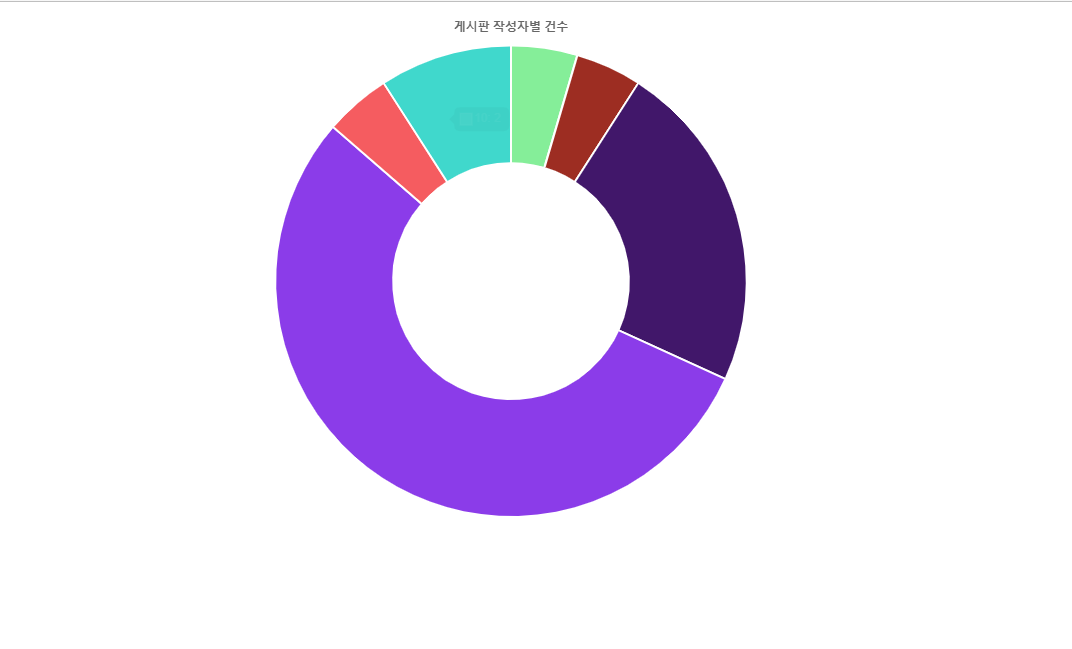
📌
<!DOCTYPE html>
<!-- /chartjs/src/main/webapp/db/pie1.html  -->
<html>
<head>
<meta charset="UTF-8">
<title>파이그래프 작성하기</title>
<script type="text/javascript"
  src="https://cdnjs.cloudflare.com/ajax/libs/Chart.js/2.9.4/Chart.min.js"></script>
<script type="text/javascript" src="http://ajax.googleapis.com/ajax/libs/jquery/3.5.1/jquery.min.js"></script>
<style>
  /* 도화지 : 그림을 그려주는 영역 */
  canvas { /* 글씨등이 선택 되지 않도록 설정 */
    -moz-user-select : none; /* 파이어폭스 브라우저 */
    -webkit-user-select : none; /* 사파리 브라우저 */
    -ms-user-select : none;   /* IE 브라우저 */
    user-select : none;       /* 표준 브라우저 */
  }
</style>
</head>
<body>
<div id="container" style="width:95%;">
  <canvas id="canvas"></canvas>  <!-- chartjs에 의해 그래프 출력 영역  -->
</div>
<script type="text/javascript">
let randomColorFactor = function() {
	return Math.round(Math.random() * 255); //0~255사이의 임의의 값
}
let randomColor = function(opacity) { //실행 할때 마다 다른 색상이 표시될 수 있도록.
	//rgba(red,green,blue,opacity(투명도))
	return "rgba(" + randomColorFactor() +","
			+ randomColorFactor() + ","
			+ randomColorFactor() + ","
			+ (opacity || '.3') + ")"; // 투명도 : 1 = 불투명, 0 = 투명
};
$(function() {
	$.ajax({
		url : "/chartjs/select",
		success : function(data) {
			chart_rtn(data);
		}
	})
})
function char_rtn(data) {
	let cxt = document.getElementById("canvas")
	let json = JSON.parse(data);
	console.log(data)
	let datas = json.datas
	let writers = json.writers;
	let colors = []
	$.each(datas,function(i,item) {
		colors[i] = randomColor(1)
	})
	const pieCharData = {
		labels : writers,
		datasets :[{
			backgroundColor : colors,
			data : datas
		}]
	}
	new Chart(cxt,{
		type : 'doughnut', //그래프의 종류
		data : pieCharData,
		options : {
			response : true,
			legend : {display : false},
			title : {display : true, text : '게시판 작성자별 건수'},
			}
	})
}
</script>
</body>
</html>- barline 그래프
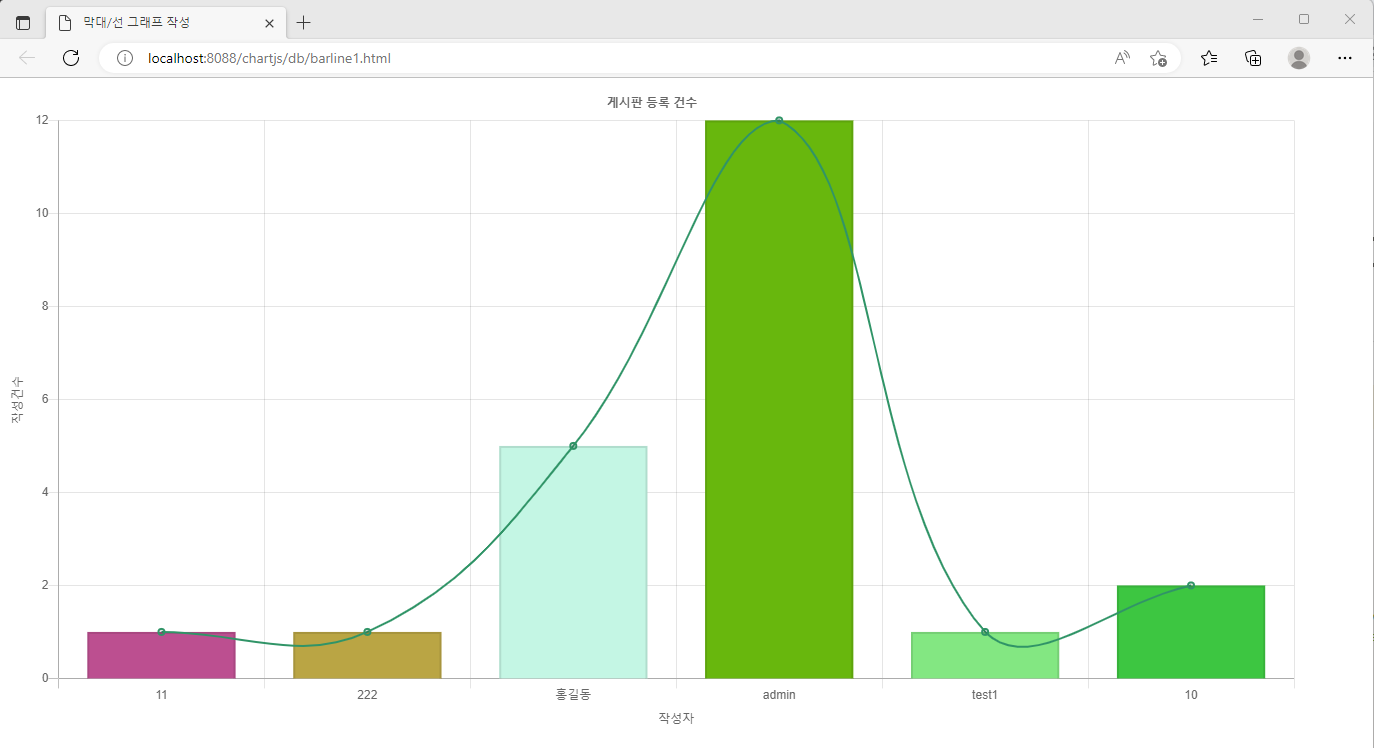
📌 barline1.html 생성
<!DOCTYPE html>
<!-- /chartjs/src/main/webapp/db/barline1.html -->
<html>
<head>
<meta charset="UTF-8">
<title>막대/선 그래프 작성</title>
<script type="text/javascript"
  src="https://cdnjs.cloudflare.com/ajax/libs/Chart.js/2.9.4/Chart.min.js"></script>
<script type="text/javascript" src="http://ajax.googleapis.com/ajax/libs/jquery/3.5.1/jquery.min.js"></script>
<style>
  /* 도화지 : 그림을 그려주는 영역 */
  canvas { /* 글씨등이 선택 되지 않도록 설정 */
    -moz-user-select : none; /* 파이어폭스 브라우저 */
    -webkit-user-select : none; /* 사파리 브라우저 */
    -ms-user-select : none;   /* IE 브라우저 */
    user-select : none;       /* 표준 브라우저 */
  }
</style>
</head>
<body>
<div id="container" style="width:95%;">
  <canvas id="canvas"></canvas>
</div>
<script type="text/javascript">
 let randomColorFactor = function() {
	 return Math.round(Math.random() * 255);
 }
 let randomColor = function(opacity) {
	 return "rgba(" + randomColorFactor() +","
			 + randomColorFactor() + ","
			 + randomColorFactor() + ","
			 + (opacity || ".3") + ")";
 }
 $(function() {
	 $.ajax({
		 url : "/chartjs/select",
		 success : function(data) {
			 chart_rtn(data);
		 }
	 })
 })
 function chart_rtn(data) {
	 console.log(data)
	 let cxt = document.getElementById("canvas")
	 let json = JSON.parse(data);
	 let datas = json.datas
	 let writers = json.writers;
	 let colors = []
	 $.each(datas, function(i,item) {
		 colors[i] = randomColor(1)
	 })
	 const chartData = {
		 labels : writers,
		 datasets : [
			 { type :"line",
			   borderWidth :2,
			   borderColor : randomColor(1),
			   label : "건수",
			   fill : false,
			   data : datas
			 },
			 { type : "bar",
			   label : "건수",
			   backgroundColor : colors,
			   borderWidth : 2,
			   data : datas
			 }
		 ]
	 }
	 new Chart(cxt, {
		 type : 'bar',
		 data : chartData,
		 options : {
			 responsive : true,
			 title : {display : true, text : "게시판 등록 건수"},
			 legend : {display : false},
			 scales : {
				 xAxes : [{display : true,
					 scaleLabel : {display : true, labelString : "작성자"}}],
				 yAxes : [{
					 scaleLabel : {display : true, labelString : "작성건수"},
					 ticks : {beginAtZero : true}
				 }]
			 }
		 }
	 })
 }
</script>
</body>
</html>