'''
2022-11-29 수업 복습
  클래스에 사용되는 특별한 함수들
    __repr__, __init__, __add__ ....

    추상 함수 : 반드시 오버라이딩 하도록 강제화된 함수
               raise NotIplementedError

    모듈 : import 모듈명
           import 모듈명 as 별명
           from 모듈명 import 함수명 => 모듈명 생략됨
           if __name__ == '__main__' : 직접 실행되는 경우만 호출

   정규식 : 문자열의 형태를 지정할 수 있는 방법.
           import re 모듈 사용
           pattern = re.compile(정규식 패턴) : 패턴 객체 생성
           리스트 = re.findall(pattern, 문자열) :
                        문자열에서 패턴에 해당하는 문자열의 목록 리턴
           pattern.search(문자) : 패턴에 맞는 문자인지 검색
           pattern.sub(치환할 문자, 대상문자열) : 치환

   파일 : open(파일명, 모드, [encoding])
	        os.getcwd() : 작업폴더 조회
	        os.chdir() : 작업폴더 변경
	        os.path.isfile(file) : 파일?
	        os.path.isdir(file) : 폴더?
'''
📌
#현재 작업 폴더 위치 조회
import os
print(os.getcwd())

📌
#작업 폴더의 위치 변경
os.chdir("D:/20220811/python/수업소스")
os.chdir("C:/Users/redbe/OneDrive/바탕 화면/Freida/파이썬")

#파일의 정보 조회
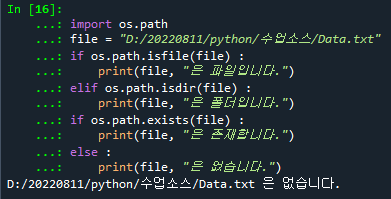
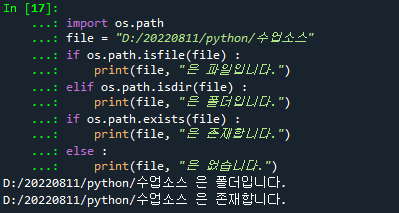
import os.path
file = "D:/20220811/python/수업소스/Data.txt"
if os.path.isfile(file) :
    print(file, "은 파일입니다.")
elif os.path.isdir(file) :
    print(file, "은 폴더입니다.")
if os.path.exists(file) :
    print(file, "은 존재합니다.")
else :
    print(file, "은 없습니다.")
📌
#
import os
# 폴더의 하위 파일목록 조회
print(os.listdir())
file = "data.txt"
os.path.exists(file) # 존재?
❓
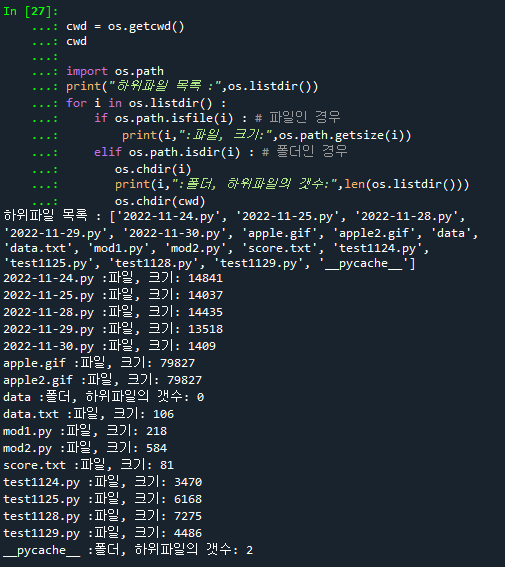
# 문제 : 작업파일의 하위파일목록 출력하기
# 파일인 경우 : 파일의 크기 os.path.getsize(파일명)
# 폴더인 경우 : 하위파일의 갯수
# 작업폴더의 하위파일 갯수
len(os.listdir()) # 현재 작업폴더의 하위파일 갯수
# 현재 작업폴더
cwd = os.getcwd()
cwd

import os.path
print("하위파일 목록 :",os.listdir())
for i in os.listdir() :
    if os.path.isfile(i) : # 파일인 경우
        print(i,":파일, 크기:",os.path.getsize(i))
    elif os.path.isdir(i) : # 폴더인 경우
       os.chdir(i)
       print(i,":폴더, 하위파일의 갯수:",len(os.listdir()))
       os.chdir(cwd)
📌
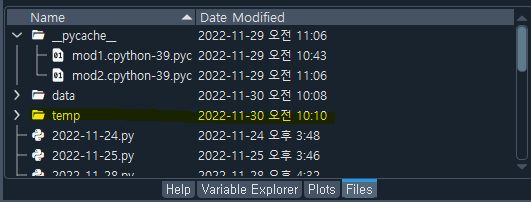
# 폴더 생성
os.mkdir("temp") # temp 폴더 생성

# 폴더 제거
os.rmdir("temp")# temp 폴더 제거
'수업(국비지원) > Python' 카테고리의 다른 글
| [Python] Pandas (0) | 2023.04.25 |
|---|---|
| [Python] sqlite - 파이썬 db , 파이썬 Oracle 접속 (0) | 2023.04.24 |
| [Python] 파일 읽기 (0) | 2023.04.24 |
| [Python] 추상 함수, 모듈 (0) | 2023.04.24 |
| [Python] 클래스에서 사용되는 특별한 함수들 (0) | 2023.04.24 |


