- 결과
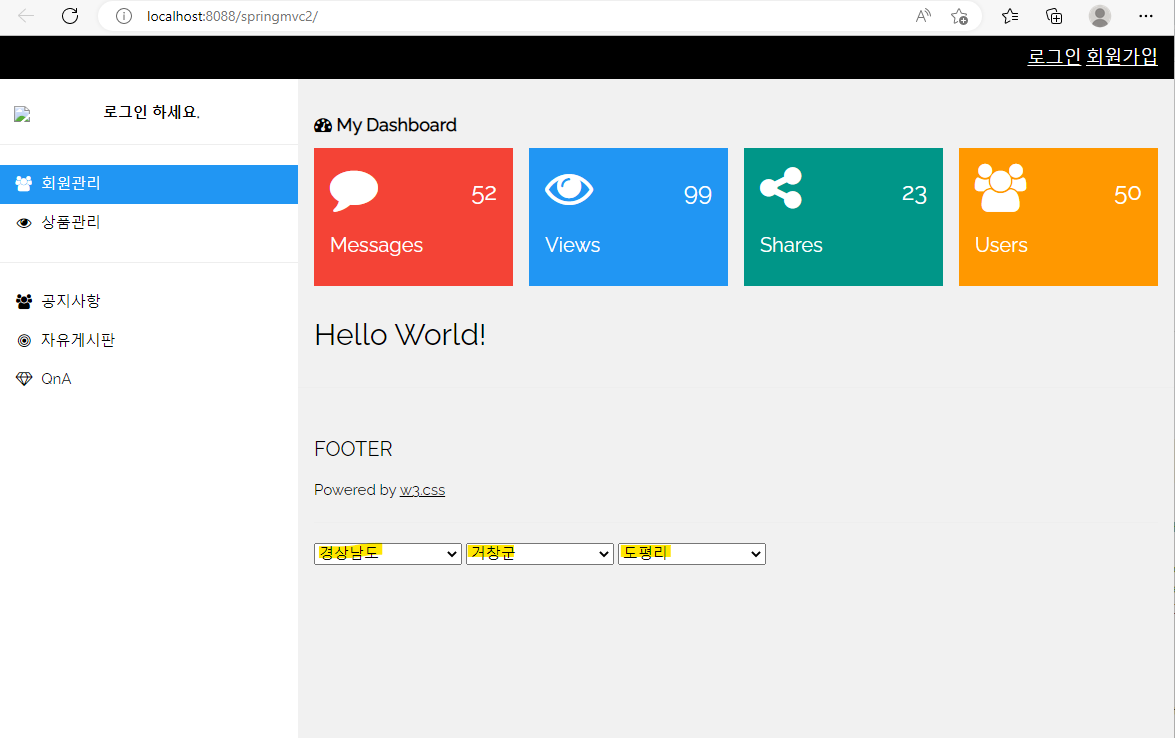
💡
AJAX으로 할때는 sitemesh는 회피 해줘야 한다.
(일부만 바꾸는 건데 충돌 할 수 있다.)(AJAX은 일반 문자열, 객체로도 보내 줄 수 있다.)
📌 kiclayout 내용 추가
<%@ page language="java" contentType="text/html; charset=UTF-8"
pageEncoding="UTF-8"%>
<%@ taglib prefix="c" uri="http://java.sun.com/jsp/jstl/core" %>
<c:set var="path" value="${pageContext.request.contextPath}"/>
<%-- /springmvc1/src/main/webapp/layout/kiclayout.jsp --%>
<!DOCTYPE html>
<html>
<head>
<title><sitemesh:write property="title"/></title>
<meta charset="UTF-8">
<meta name="viewport" content="width=device-width, initial-scale=1">
<link rel="stylesheet" href="https://www.w3schools.com/w3css/4/w3.css">
<link rel="stylesheet" href="https://fonts.googleapis.com/css?family=Raleway">
<link rel="stylesheet" href="https://cdnjs.cloudflare.com/ajax/libs/font-awesome/4.7.0/css/font-awesome.min.css">
<script type="text/javascript" src="http://ajax.googleapis.com/ajax/libs/jquery/3.5.1/jquery.min.js"></script>
<%-- ckeditor 설정 --%>
<script type="text/javascript" src="http://cdn.ckeditor.com/4.5.7/standard/ckeditor.js"></script>
<style>
html,body,h1,h2,h3,h4,h5 {font-family: "Raleway", sans-serif}
</style>
<sitemesh:write property="head"/>
</head>
<body class="w3-light-grey">
<!-- Top container -->
<div class="w3-bar w3-top w3-black w3-large" style="z-index:4">
<button class="w3-bar-item w3-button w3-hide-large w3-hover-none w3-hover-text-light-grey" onclick="w3_open();"><i class="fa fa-bars"></i> Menu</button>
<span class="w3-bar-item w3-right">
<c:if test="${empty sessionScope.loginUser}">
<a href="${path}/user/login">로그인</a>
<a href="${path}/user/join">회원가입</a>
</c:if>
<c:if test="${!empty sessionScope.loginUser}">
${sessionScope.loginUser.username}님이 로그인 하셨습니다.
<a href="${path}/user/logout">로그아웃</a>
</c:if>
</span>
</div>
<!-- Sidebar/menu -->
<nav class="w3-sidebar w3-collapse w3-white w3-animate-left" style="z-index:3;width:300px;" id="mySidebar"><br>
<div class="w3-container w3-row">
<div class="w3-col s4">
<img src="${path}/image/logo.png" class="w3-circle w3-margin-right" style="width:100px">
</div>
<div class="w3-col s8 w3-bar">
<c:if test="${!empty sessionScope.loginUser}">
<span>반갑습니다, <strong>${sessionScope.loginUser.username}님</strong></span><br>
</c:if>
<c:if test="${empty sessionScope.loginUser}">
<span><strong>로그인 하세요.</strong></span><br>
</c:if>
</div>
</div>
<hr>
<div class="w3-bar-block">
<a href="#" class="w3-bar-item w3-button w3-padding-16 w3-hide-large w3-dark-grey w3-hover-black" onclick="w3_close()" title="close menu"><i class="fa fa-remove fa-fw"></i> Close Menu</a>
<a href="${path}/user/mypage?id=${loginUser.userid}" class="w3-bar-item w3-button w3-padding w3-blue">
<i class="fa fa-users fa-fw">
</i> 회원관리</a>
<a href="${path}/item/list" class="w3-bar-item w3-button w3-padding">
<i class="fa fa-eye fa-fw">
</i> 상품관리</a>
<hr>
<a href="${path}/board/list?doardid=1" class="w3-bar-item w3-button w3-padding">
<i class="fa fa-users fa-fw">
</i> 공지사항</a>
<a href="${path}/board/list?boardid=2" class="w3-bar-item w3-button w3-padding">
<i class="fa fa-bullseye fa-fw">
</i> 자유게시판</a>
<a href="${path}/board/list?boardid=3" class="w3-bar-item w3-button w3-padding">
<i class="fa fa-diamond fa-fw">
</i> QnA</a>
</div>
</nav>
<!-- Overlay effect when opening sidebar on small screens -->
<div class="w3-overlay w3-hide-large w3-animate-opacity" onclick="w3_close()" style="cursor:pointer" title="close side menu" id="myOverlay"></div>
<!-- !PAGE CONTENT! -->
<div class="w3-main" style="margin-left:300px;margin-top:43px;">
<!-- Header -->
<header class="w3-container" style="padding-top:22px">
<h5><b><i class="fa fa-dashboard"></i> My Dashboard</b></h5>
</header>
<div class="w3-row-padding w3-margin-bottom">
<div class="w3-quarter">
<div class="w3-container w3-red w3-padding-16">
<div class="w3-left"><i class="fa fa-comment w3-xxxlarge"></i></div>
<div class="w3-right">
<h3>52</h3>
</div>
<div class="w3-clear"></div>
<h4>Messages</h4>
</div>
</div>
<div class="w3-quarter">
<div class="w3-container w3-blue w3-padding-16">
<div class="w3-left"><i class="fa fa-eye w3-xxxlarge"></i></div>
<div class="w3-right">
<h3>99</h3>
</div>
<div class="w3-clear"></div>
<h4>Views</h4>
</div>
</div>
<div class="w3-quarter">
<div class="w3-container w3-teal w3-padding-16">
<div class="w3-left"><i class="fa fa-share-alt w3-xxxlarge"></i></div>
<div class="w3-right">
<h3>23</h3>
</div>
<div class="w3-clear"></div>
<h4>Shares</h4>
</div>
</div>
<div class="w3-quarter">
<div class="w3-container w3-orange w3-text-white w3-padding-16">
<div class="w3-left"><i class="fa fa-users w3-xxxlarge"></i></div>
<div class="w3-right">
<h3>50</h3>
</div>
<div class="w3-clear"></div>
<h4>Users</h4>
</div>
</div>
</div>
<div class="w3-panel">
<sitemesh:write property="body"/>
</div>
<hr>
<!-- Footer -->
<footer class="w3-container w3-padding-16 w3-light-grey">
<h4>FOOTER</h4>
<p>Powered by <a href="https://www.w3schools.com/w3css/default.asp" target="_blank">w3.css</a></p>
<hr>
<div>
<span id="si">
<select name="si" onchange="getText('si')">
<option value="">시도를 선택하세요</option>
</select>
</span>
<span id="gu">
<select name="gu" onchange="getText('gu')">
<option value="">구군을 선택하세요</option>
</select>
</span>
<span id="dong">
<select name="dong">
<option value="">동리를 선택하세요</option>
</select>
</span></div>
</footer>
<!-- End page content -->
</div>
<script>
// Get the Sidebar
var mySidebar = document.getElementById("mySidebar");
// Get the DIV with overlay effect
var overlayBg = document.getElementById("myOverlay");
// Toggle between showing and hiding the sidebar, and add overlay effect
function w3_open() {
if (mySidebar.style.display === 'block') {
mySidebar.style.display = 'none';
overlayBg.style.display = "none";
} else {
mySidebar.style.display = 'block';
overlayBg.style.display = "block";
}
}
// Close the sidebar with the close button
function w3_close() {
mySidebar.style.display = "none";
overlayBg.style.display = "none";
}
</script>
<script type="text/javascript">
//$(function() : 문서 준비 완료.
$(function() {
let divid
let si
/* 서버에서 배열 객체로 직접 전달
$.ajax({ //jquery를 이용한 ajax 처리
url : "${path}/ajax/select",
success : function(arr) {
//arr : 배열객체로 서버에 직접 전달.
$.each(arr,function(i,item) {
$("select[name=si]").append(function(){
return "<option>" + item + "</option>"
})
})
}
})
*/
//서버에서 문자열로 데이터 전달받기
$.ajax({ //jquery를 이용한 ajax 처리
url : "${path}/ajax/select2",
success : function(data) {
//data : utf-8로 인코딩 된 순수 문자열 데이터.
//배열로 변환
let arr = data.substring(data.indexOf('[')+1, data.indexOf(']')).split(",")
$.each(arr,function(i,item) {
$("select[name=si]").append(function(){
return "<option>" + item + "</option>"
})
})
}
})
})
function getText(name) { //gu
let city = $("select[name='si']").val();
let gu = $("select[name='gu']").val();
let disname;
let toptext="구군을 선택하세요";
let params="";
if(name == "si") {
params = "si=" + city.trim();
disname = "gu";
} else if(name == "gu") {
params = "si=" + city.trim() + "&gu=" + gu.trim();
disname = "dong";
toptext = "동리를 선택하세요";
} else {
return;
}
$.ajax({
url : "${path}/ajax/select",
type : "POST",
data : params,
success : function(arr) {
//데이터를 추가해야 하는 select 태그의 option 태그들을 전부 제거
$("select[name=" + disname + "] option").remove();
//첫번째 option 객체를 추가
$("select[name=" + disname + "]").append(function() {
return "<option value=''>" + toptext + "</option>"
})
//arr : 서버에서 전송한 배열 객체.
$.each(arr,function(i,item) {
$("select[name=" + disname + "]").append(function() {
return "<option>" + item + "</option>"
})
})
}
})
}
</script>
</body>
</html>📌 AjaxController 생성
package controller;

import java.io.BufferedReader;
import java.io.FileReader;
import java.io.IOException;
import java.util.ArrayList;
import java.util.LinkedHashSet;
import java.util.List;
import java.util.Set;

import javax.servlet.http.HttpServletRequest;

import org.springframework.beans.factory.annotation.Autowired;
import org.springframework.web.bind.annotation.RequestMapping;
import org.springframework.web.bind.annotation.RestController;

import logic.ShopService;
/*
 *  @Controller : @Component + Controller 기능
 *      메서드 리턴 타입 : String => 뷰의 이름 지정
 *                     ModelAndView => 뷰의 이름 지정 + 데이터
 *
 *  @RestController  : controller의 하위클래스.
 *                     @Controller + Controller 기능 + 클라이언트에 값 전달시 뷰 없이 바로 데이터 전달
 *      메서드 리턴 타입 : String => 브라우저로 전달 할 데이터 값.
 *                     Object => 브라우저로 전달할 데이터 값.
 *      spring 4.0 이후에 추가된 컨트롤러
 *      @ResponseBody 기능 : 메서드의 어노테이션으로 설정.
 */
@RestController
@RequestMapping("ajax")
public class AjaxController {
	@Autowired
	ShopService service;

	@RequestMapping("select")
	public List<String> select(String si, String gu, HttpServletRequest request) {
		/*
		 * BufferedReader : Reader => 문자형 입력 스트림
		 *   - readLine() 메서드를 멤버로 가짐. 문자형 입력 스트림이고 한줄씩 읽을 수 있는 기능 있음
		 *   - FilteredReader : 기존의 스트림에 필터 기능 추가.
		 *                      생성자에서 기존 스트림을 제공해줘야 한다.(생성자에 매개변수 없는 생성자는 없음.)
		 */
		BufferedReader fr = null;
		//path : sido.txt 파일의 절대 경로
		String path = request.getServletContext().getRealPath("/")
				+ "file/sido.txt";
		try {
			//FileReader(path) : path 위치의 파일을 읽기 위한 스트림
			//fr : sido.txt 파일을 읽기 위한 스트림 객체.
			fr = new BufferedReader(new FileReader(path));
		} catch(Exception e) {
			e.printStackTrace();
		}
		//Set 객체 : 중복 불가.
		//LinkedHashSet : 중복불가. 순서유지 가능.
		Set<String> set = new LinkedHashSet<>();
		String data = null;
		//si, gu 파라미터 값이 없는 경우 : 처음 화면 초기화시 파라미터 값이 없는 경우
		if(si == null && gu == null) { //최상단에 있는 시도에 해당하는 데이터를 찾아서 리턴.
			try {
				//readLine() : 한줄씩 읽을 수 있게 한다.
				while((data = fr.readLine()) != null) {
					//"\\\\s+" : \\\\s : 공백, + :1개 이상
					//         공백 한개 이상으로 문자를 분리하여 배열 저장
					String[] arr = data.split("\\\\s+");
					if(arr.length >= 3) set.add(arr[0].trim());
				}
			} catch(IOException e) {
				e.printStackTrace();
			}
		} else if(gu == null) { //si 파라미터 존재
			si = si.trim();
		try {
			while ((data = fr.readLine()) != null) {
				String[] arr = data.split("\\\\s+");
				if(arr.length >= 3 && arr[0].equals(si) && !arr[1].contains(arr[0])) {
					set.add(arr[1].trim()); //구 정보 저장
				}
			}
		} catch(IOException e) {
			e.printStackTrace();
		}
	}   else { //si 파라미터 존재, gu 파라미터 존재
		si = si.trim();
		gu = gu.trim();
		try {
			while((data = fr.readLine()) != null) {
				String[] arr = data.split("\\\\s+");
				if(arr.length >= 3 && arr[0].equals(si) &&
				   arr[1].equals(gu) && !arr[0].equals(arr[1]) &&
				   !arr[2].contains(arr[1])) {
					if(arr.length > 3) {
						if(arr[3].contains(arr[1])) continue;
						arr[2] += " " + arr[3];
					}
					set.add(arr[2].trim());//동 정보 저장
				}
			}
		} catch(IOException e) {
			e.printStackTrace();
		}
	}
		List<String> list = new ArrayList<>(set);
		return list; //배열로 브라우저(ajax 객체)에 전달
	}
	/*produces : 클라이언트쪽으로 전달되는 데이터의 특징을 설정.
	   text/plain : 순수 문자열.
	   charset=utf-8 : 문자열의 인코딩 방식을 전달
	*/
	@RequestMapping(value="select2", produces="text/plain; charset=utf-8")
	public String select2(String si, String gu, HttpServletRequest request) {
		BufferedReader fr = null;
		String path = request.getServletContext().getRealPath("/")
				+ "file/sido.txt";
		try {
			fr = new BufferedReader(new FileReader(path));
		} catch(Exception e) {
			e.printStackTrace();
		}
		Set<String> set = new LinkedHashSet<>();
		String data = null;
		if(si == null && gu == null) {
			try {
				while((data = fr.readLine()) != null) {
					String[] arr = data.split("\\\\s+");
					if(arr.length >= 3) set.add(arr[0].trim());
				}
			} catch(IOException e) {
				e.printStackTrace();
			}
		}
		List<String> list = new ArrayList<>(set);
		return list.toString(); //문자열로 브라우저(ajax 객체)에 전달
	}
}
📌 pom.xml 내용 추가
<project xmlns="http://maven.apache.org/POM/4.0.0" xmlns:xsi="http://www.w3.org/2001/XMLSchema-instance"
  xsi:schemaLocation="http://maven.apache.org/POM/4.0.0 http://maven.apache.org/maven-v4_0_0.xsd">
  <modelVersion>4.0.0</modelVersion>
  <groupId>kr.kic</groupId>
  <artifactId>springmvc2</artifactId>
  <packaging>war</packaging>
  <version>0.0.1-SNAPSHOT</version>
  <name>springmvc2 Maven Webapp</name>
  <url>http://maven.apache.org</url>

<!--spring 버전 설정 -->
  <properties>
     <project.build.sourceEncoding>UTF-8</project.build.sourceEncoding>
     <spring.version>4.3.30.RELEASE</spring.version>
     <spring.version1>5.2.19.RELEASE</spring.version1>
  </properties>

<!-- maven의 기본 원격 저장소 : https://mvnrepository.com/ -->
<!-- maven 환경에서 사용되는 원격 저장소 추가로 설정 -->
  <repositories>
     <repository>
       <id>oracle</id>
       <name>ORACLE JDBC Repository</name>
       <url>http://maven.jahia.org/maven2</url>
     </repository>
  </repositories>

  <dependencies>

  <!-- 톰캣 서버 대신 설정 -->
<dependency>
    <groupId>org.apache.tomcat</groupId>
    <artifactId>tomcat-catalina</artifactId>
    <version>9.0.63</version>
</dependency>

    <dependency>
      <groupId>junit</groupId>
      <artifactId>junit</artifactId>
      <version>3.8.1</version>
      <scope>test</scope>
    </dependency>

<!-- https://mvnrepository.com/artifact/org.springframework/spring-context -->
<dependency>
    <groupId>org.springframework</groupId>
    <artifactId>spring-context</artifactId>
    <version>${spring.version}</version>
</dependency>

<!-- 웹 환경을 만들수 있도록 하는 -->
<dependency>
    <groupId>org.springframework</groupId>
    <artifactId>spring-web</artifactId>
    <version>${spring.version}</version>
</dependency>

<dependency>
    <groupId>org.springframework</groupId>
    <artifactId>spring-webmvc</artifactId>
    <version>${spring.version}</version>
</dependency>

<!-- db 연결 해주는  -->
<dependency>
    <groupId>org.springframework</groupId>
    <artifactId>spring-jdbc</artifactId>
    <version>${spring.version}</version>
</dependency>

<!-- 오라클 관련 설정 -->
<dependency>
    <groupId>com.oracle</groupId>
    <artifactId>ojdbc5</artifactId>
    <version>11.2.0.2.0</version>
</dependency>

<!-- Connection Pool 관련 설정 -->
<dependency>
    <groupId>com.mchange</groupId>
	<artifactId>c3p0</artifactId>
	<version>0.9.5.3</version>
</dependency>

<!-- MyBatis 관련 설정-->
<!-- https://mvnrepository.com/artifact/org.mybatis/mybatis -->
<dependency>
    <groupId>org.mybatis</groupId>
    <artifactId>mybatis</artifactId>
    <version>3.4.6</version>
</dependency>
<!-- https://mvnrepository.com/artifact/org.mybatis/mybatis-spring -->
<dependency>
    <groupId>org.mybatis</groupId>
    <artifactId>mybatis-spring</artifactId>
    <version>1.3.2</version>
</dependency>

<!-- https://mvnrepository.com/artifact/jstl/jstl -->
<dependency>
    <groupId>jstl</groupId>
    <artifactId>jstl</artifactId>
    <version>1.2</version>
</dependency>

<!-- 유효성 검사 설정 -->
<!-- https://mvnrepository.com/artifact/javax.validation/validation-api -->
<dependency>
    <groupId>javax.validation</groupId>
    <artifactId>validation-api</artifactId>
    <version>2.0.1.Final</version>
</dependency>
<dependency>
    <groupId>org.hibernate</groupId>
    <artifactId>hibernate-validator</artifactId>
    <version>6.1.0.Final</version>
</dependency>

<!-- 파일 업로드 설정 -->
<dependency>
    <groupId>commons-fileupload</groupId>
    <artifactId>commons-fileupload</artifactId>
    <version>1.3.3</version>
</dependency>
<dependency>
    <groupId>commons-beanutils</groupId>
    <artifactId>commons-beanutils</artifactId>
    <version>1.9.3</version>
</dependency>
<dependency>
    <groupId>commons-digester</groupId>
    <artifactId>commons-digester</artifactId>
    <version>2.1</version>
</dependency>

<!-- sitemesh 설정 -->
<!-- https://mvnrepository.com/artifact/org.sitemesh/sitemesh -->
<dependency>
    <groupId>org.sitemesh</groupId>
    <artifactId>sitemesh</artifactId>
    <version>3.0.1</version>
</dependency>

<!-- AOP 설정-->
<dependency>
  <groupId>org.aspectj</groupId>
  <artifactId>aspectjweaver</artifactId>
  <version>1.9.6</version>
</dependency>

<!-- @RestController 에서 Collection 객체를 자바스크립트의 객체로 전달하기 위한 설정
     List 객체 : 순서를 가지고 있다.(첨자를 통해서도 데이터 가져올 수 있다.) 자동으로 Array 객체로 전달 됨
     Map 객체 : JSon 객체로 전달됨.
  -->
<dependency>
	<groupId>com.fasterxml.jackson.core</groupId>
    <artifactId>jackson-core</artifactId>
    <version>2.10.2</version>
</dependency>
<!-- https://mvnrepository.com/artifact/com.fasterxml.jackson.core/jackson-databind -->
<dependency>
    <groupId>com.fasterxml.jackson.core</groupId>
    <artifactId>jackson-databind</artifactId>
    <version>2.10.2</version>
</dependency>

<!--  json 설정 -->
<!-- https://mvnrepository.com/artifact/com.googlecode.json-simple/json-simple -->
<dependency>
<groupId>com.googlecode.json-simple</groupId>
<artifactId>json-simple</artifactId>
<version>1.1.1</version>
</dependency>

  </dependencies>
  <build>
    <finalName>springmvc2</finalName>
    <!-- pom.xml의 첫번째 줄에 plugin 관련 오류 발생 시 추가 -->
<plugins>
  <plugin>
   <artifactId>maven-war-plugin</artifactId>
   <version>3.2.2</version>
  </plugin>
</plugins>
  </build>
</project>
'수업(국비지원) > Ajax' 카테고리의 다른 글
| [AJAX] chartjs - 그래프 그리기(한글) (0) | 2023.04.21 |
|---|---|
| [AJAX] chartjs - 그래프 그리기 (0) | 2023.04.21 |
| [AJAX] ajax - jquery 이용한 시,군,구 선택 (0) | 2023.04.21 |
| [AJAX] jquery를 이용한 ajax 연습 (0) | 2023.04.21 |
| [AJAX] FETCH 함수 - ajax.js 이용, jquery ajax 파라미터 전송 (0) | 2023.04.21 |


